
Key Takeaways
- Performance Max campaigns are about strategically guiding Google's AI, not just automation
- Product feed optimization is the #1 factor influencing campaign success
- Google recommends at least 50-100 conversions per PMax campaign per month
- Always exclude branded terms from generic campaigns to avoid inflated ROAS
- Run campaigns for at least 6 weeks to allow sufficient algorithm learning
What Is Performance Max?
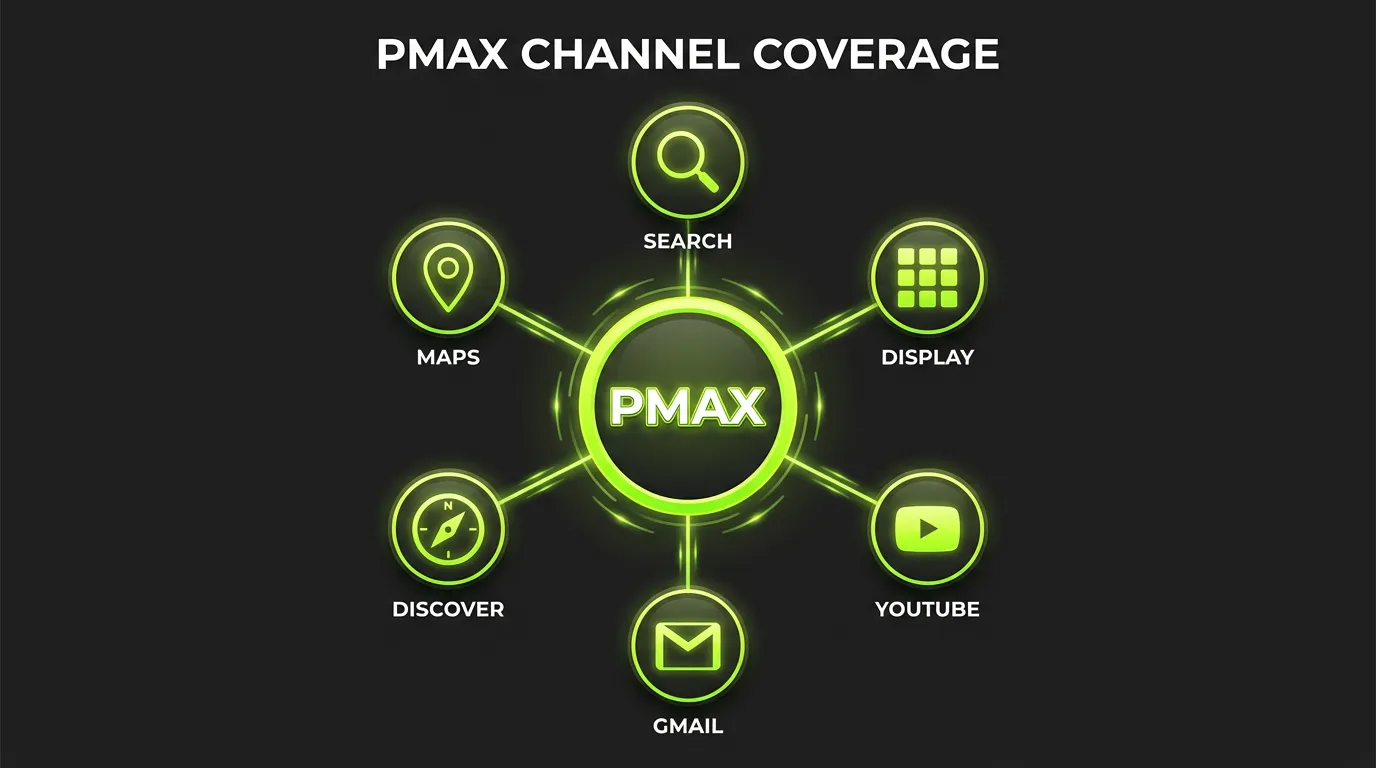
:::highlight The Core Concept Performance Max is Google's AI-powered campaign type that runs ads across all Google channels — Search, Display, YouTube, Discover, Gmail, and Maps — from a single campaign. :::
It's not about giving up control. It's about providing the right inputs so Google's machine learning can find your best customers wherever they are.
If you're scaling this across accounts, AdBid pulls planning, launch, and optimization into a single workflow.
I've managed PMax campaigns for e-commerce brands spending $500K+ monthly. The difference between success and failure comes down to understanding what to control and what to let the algorithm handle.
When to Use Performance Max
Ideal Use Cases
E-commerce with Product Feeds:
- Shopping-focused businesses
- Large product catalogs
- Clear conversion tracking
Lead Generation (with caveats):
- Well-defined conversion events
- CRM integration for offline conversion import
- Sufficient conversion volume
Local Businesses:
- Driving store visits
- Local service providers
- Multi-location brands

When to Be Cautious
:::warning PMax Limitations Performance Max isn't always the best choice. New accounts with limited conversion data, very niche B2B targeting, and campaigns requiring placement control may perform better with traditional campaign types. :::
Campaign Structure Best Practices
The Consolidation Principle
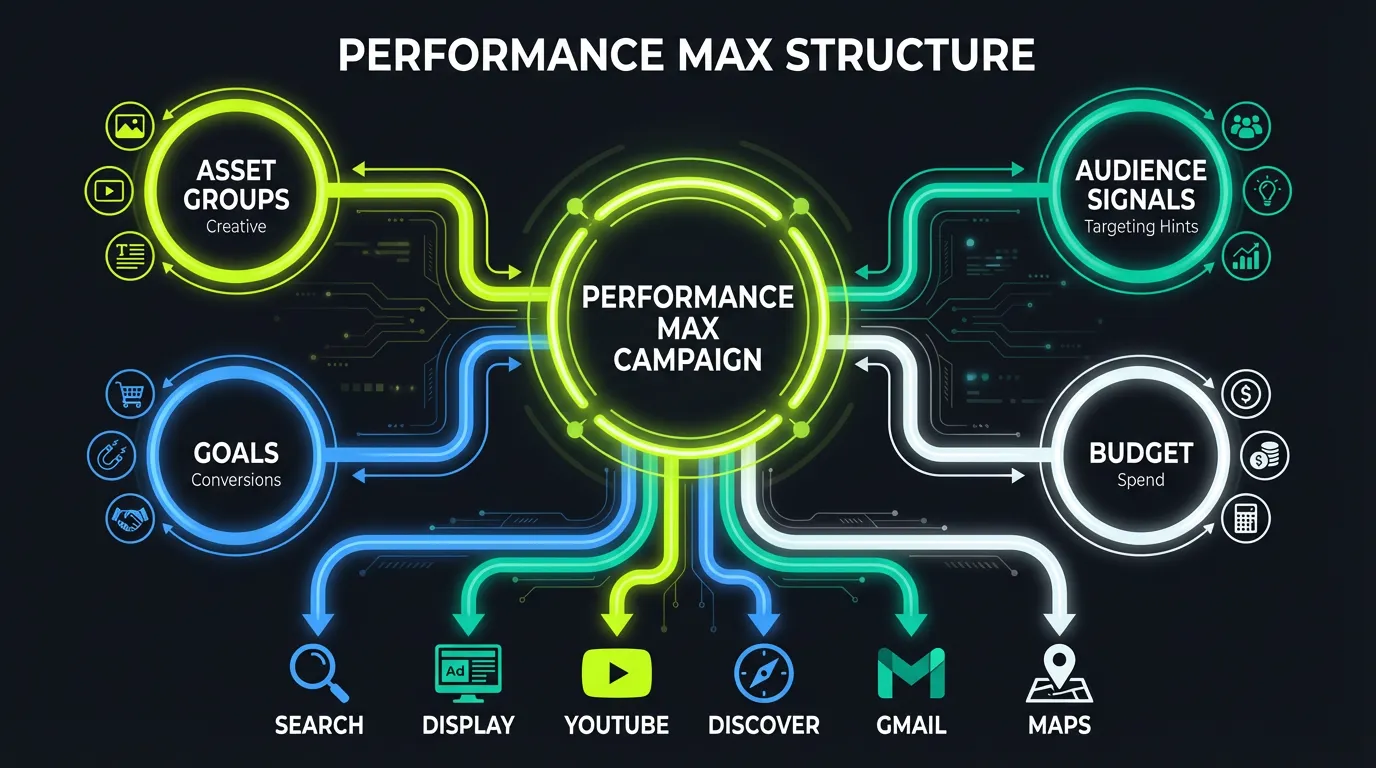
Google recommends consolidating Performance Max campaigns where possible. But this doesn't mean one campaign for everything.
Recommended Structure:
| Campaign Type | Use Case |
|---|---|
| Generic PMax | Prospecting for new customers |
| Brand PMax | Branded traffic (separated for ROAS clarity) |
| Category PMax | When categories need different ROAS targets |
| High-Value PMax | Premium products with higher margins |
Asset Groups Strategy
:::tip Asset Group Logic Treat each asset group as a mini campaign. Each should focus on a product category or specific intent, not everything at once. :::
Asset Group Best Practices:
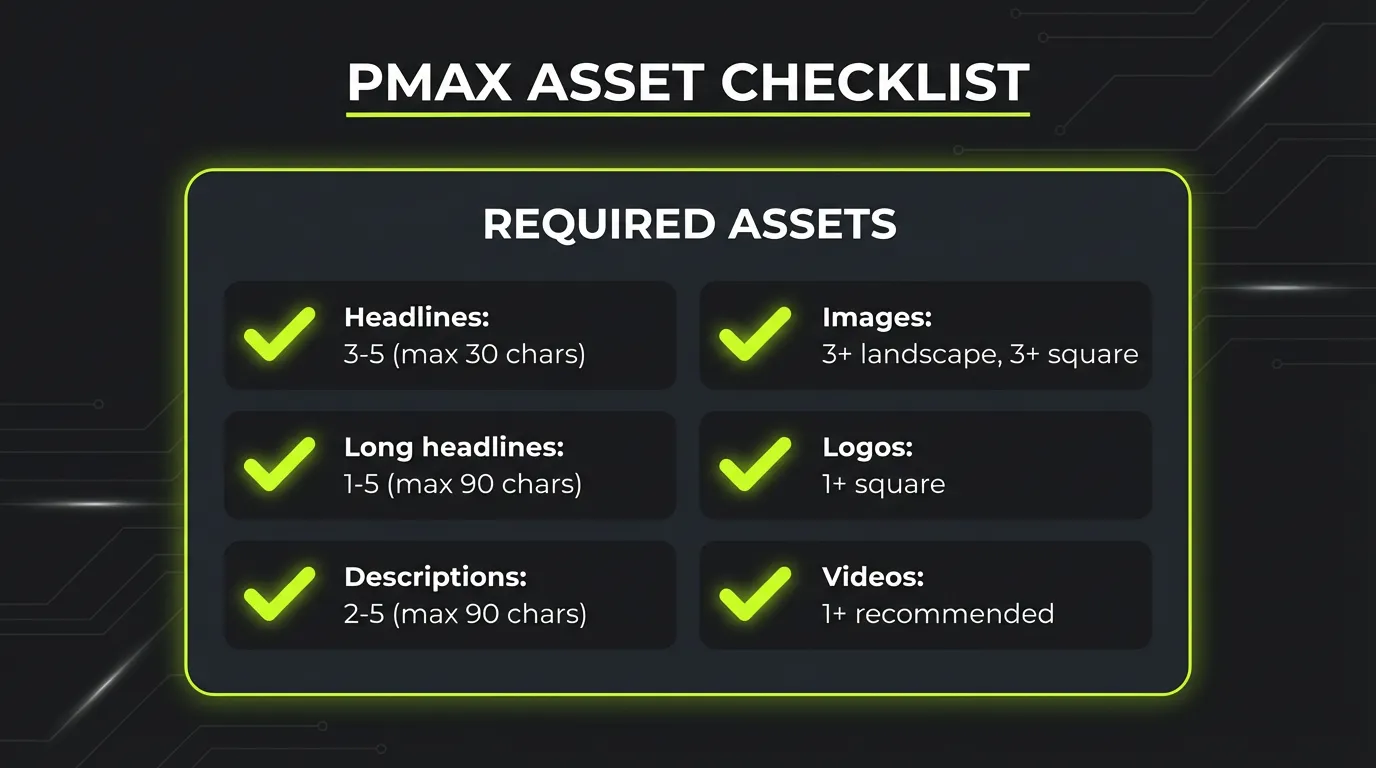
- 15-20 text assets per group
- 20+ image assets (mix of product and lifestyle)
- 5+ video assets
- Compelling headlines that address different intents
Product Feed Optimization
Why It's #1 Priority
Your product feed is the foundation of PMax success. The algorithm relies on it for targeting, creative assembly, and bidding decisions.
Feed Optimization Checklist:
Titles:
- Include brand, product type, and key attributes
- Front-load important keywords
- 70-150 characters optimal
Descriptions:
- Unique, benefit-focused content
- Include use cases and specifications
- 500-1000 characters
Images:
- High-quality product shots
- Lifestyle images (not just white background)
- Multiple angles
Data Accuracy:
- Correct pricing (mismatches = disapprovals)
- Accurate availability
- Complete attributes (size, color, material)
"Optimizing your product feed is the #1 factor influencing campaign success. Performance Max continues to rely heavily on product feeds in 2025."
Audience Signals
Understanding Signals
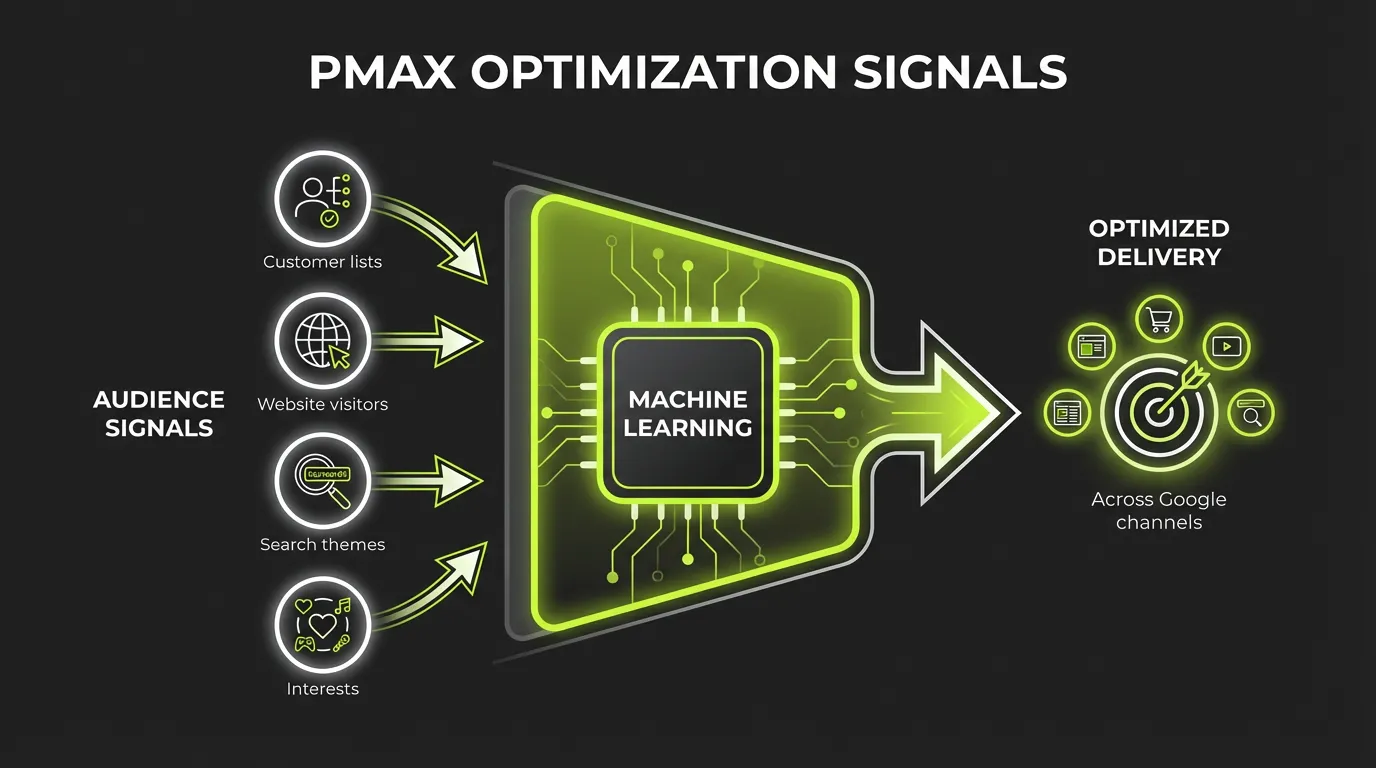
:::info What Are Signals? Audience signals are suggestions — not targeting restrictions. They help steer the algorithm toward valuable prospects initially, but Google can expand beyond them if it finds better opportunities. :::
Signal Types:
Custom Segments:
- People who searched specific terms
- People who visited specific websites/apps
Your Data:
- Customer lists (purchasers, leads)
- Website visitors
- App users
Detailed Demographics:
- Life events
- Income levels
- Parental status
Interests & Behaviors:
- In-market audiences
- Affinity audiences
Signal Strategy
For Cold Prospecting:
- Use competitor website visitors as signals
- Add high-intent search terms
- Include in-market audiences
For Retargeting-Heavy Campaigns:
- Layer customer lists
- Add cart abandoners
- Include recent website visitors
Bidding Strategy
Budget Guidelines
Google recommends a minimum daily budget of 3x your target CPA for optimal performance.
Budget Benchmarks:
| Monthly Conversions | Recommended Daily Budget |
|---|---|
| 30-50 | 1x target CPA |
| 50-100 | 2x target CPA |
| 100+ | 3x+ target CPA |
Bidding Options
Maximize Conversions:
- Best for volume-focused goals
- Use when CPA flexibility exists
- Good for campaign launch phase
Maximize Conversion Value:
- Best for e-commerce
- Optimizes for revenue, not just conversions
- Set target ROAS once data is sufficient
Target CPA/ROAS:
- Add once 50+ conversions achieved
- Start conservative (10-20% above current performance)
- Adjust gradually (no more than 10% at a time)
Brand Exclusions
Why This Matters
:::warning Brand Traffic Trap Performance Max will prioritize search terms that perform best — typically branded terms. Including brand searches may boost overall ROAS, but you won't be driving new customer acquisition. :::
Best Practice:
- Exclude your branded terms from generic PMax
- Create separate Brand PMax if needed
- Use this to accurately measure prospecting ROAS
How to Exclude
- Account-level brand exclusions
- Campaign-level negative keyword lists
- Exclude specific brand terms and variations
Creative Assets
Asset Requirements
Text:
- Headlines: 3-5 short (30 char), 1-5 long (90 char)
- Descriptions: 2-5 short (60 char), 1-5 long (90 char)
- Business name
Images:
- Landscape: 1200x628 (minimum 600x314)
- Square: 1200x1200 (minimum 300x300)
- Portrait: 960x1200 (minimum 480x600)
Videos:
- Horizontal, square, and vertical formats
- 10-60 seconds optimal
- Auto-generated if not provided (usually worse)
Asset Refresh Cadence
:::tip Refresh Schedule Replace underperforming assets instead of removing them. Google recommends refreshing outdated or "low" performing assets at least once every 3 months. :::
Monthly Review:
- Check asset performance labels (Best, Good, Low)
- Replace "Low" performers
- Test new variations
Conversion Tracking
The Foundation
:::danger Critical Setup Without accurate conversion tracking, PMax cannot optimize effectively. This is non-negotiable. :::
Essential Setup:
- Google Ads conversion tracking
- Enhanced Conversions enabled
- Offline conversion import (if applicable)
- Value tracking (for e-commerce)
Advanced Tracking
CRM Integration:
- Import lead quality data
- Track offline conversions
- Feed back revenue data
Profit-Based Bidding:
- Pass margin data with conversions
- Optimize for profit, not just revenue
- More sophisticated but more accurate
Campaign Diagnostics
Key Metrics to Monitor
| Metric | What to Watch |
|---|---|
| Conversions | Volume and trend |
| Conversion Value | Revenue generation |
| ROAS | Efficiency vs. target |
| Impression Share | Market opportunity |
| Asset Performance | Creative effectiveness |
Search Terms Analysis
While limited, you can still see search themes:
- Go to Insights → Search terms
- Look for emerging categories
- Identify negatives to add
- Find expansion opportunities
Common PMax Mistakes
Mistake 1: Insufficient Data
Running PMax with fewer than 30 monthly conversions starves the algorithm.
Fix: Use traditional campaigns first, then transition to PMax once volume is established.
Mistake 2: Weak Product Feed
Generic titles, missing attributes, and poor images = poor performance.
Fix: Audit feed quality before launching. Use supplemental feeds for optimization.
Mistake 3: No Brand Exclusions
Inflated ROAS from brand traffic masks true prospecting performance.
Fix: Exclude brand terms. Measure acquisition separately.
Mistake 4: Impatience
Pulling the plug before the algorithm can learn.
Fix: Commit to 6 weeks minimum. Make changes gradually.
Mistake 5: Single Asset Group
One asset group trying to cover all products.
Fix: Segment by category, intent, or margin. Different products need different messaging.
PMax vs. Traditional Campaigns
When PMax Wins
- E-commerce with good product feeds
- Multi-channel reach needed
- Sufficient conversion data
- Goal is incremental reach
When Traditional Wins
- Very specific targeting needs
- Placement control required
- Limited conversion data
- Brand safety concerns
The Hybrid Approach
Many advertisers run both:
- PMax for scale and reach
- Search campaigns for high-intent queries
- Comparison shopping for competitive products
The Bottom Line
Performance Max is powerful when set up correctly. The key is understanding that you're training an AI, not configuring traditional targeting.
Provide the best possible inputs:
- Optimized product feeds
- Quality creative assets
- Accurate conversion tracking
- Strategic audience signals
Then give the algorithm time to learn.
:::tip Start Here Before launching PMax, audit your product feed and conversion tracking. These two factors will determine 80% of your success. Get them right first. :::
Need help optimizing your Google campaigns alongside Meta and TikTok? AdBid provides unified cross-platform analytics and performance tracking. Start your free trial.