
Part of our Meta Ads Platform guide series.
Key Takeaways
- Value Rules tell Meta which customer segments are worth more to your business
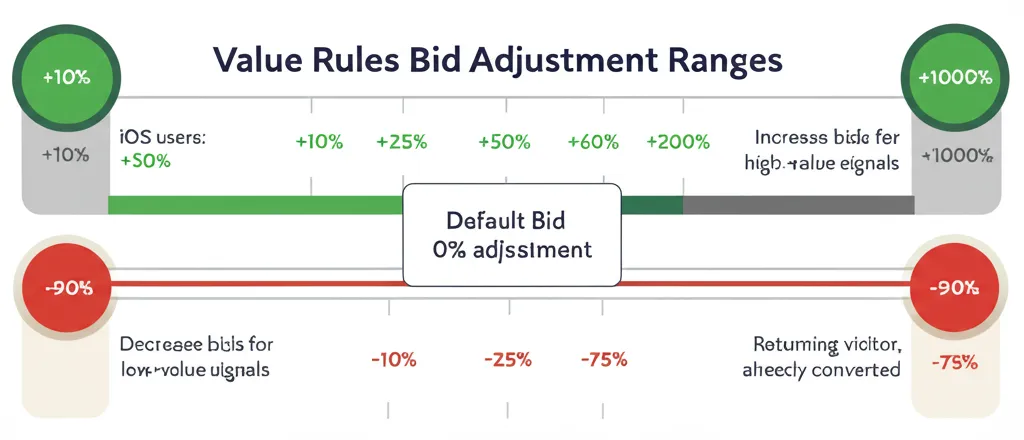
- You can increase bids up to +1,000% or decrease up to -90% (Meta Business Help) based on audience signals
- 2026 expansion: now available for ALL campaign objectives, not just sales
- Up to six rule sets per account for simultaneous testing
- City-level and placement-level targeting now supported
What Are Meta Value Rules?
:::highlight The Core Concept Value Rules let you tell Meta's algorithm: "These customers are worth more to me — bid higher for them." Instead of treating all conversions equally, you optimize for the conversions that actually matter. :::
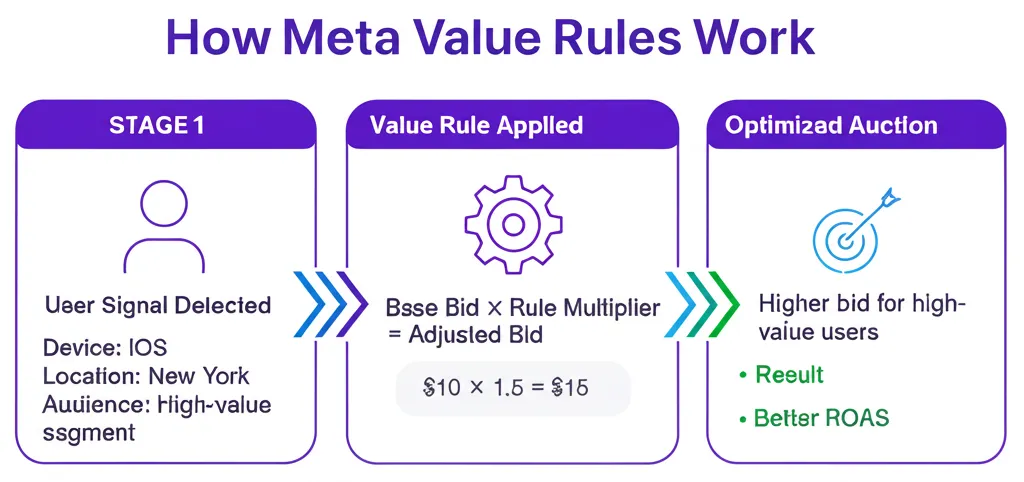
Here's the problem Value Rules solve: Meta's default optimization targets the lowest-cost conversions. But not all conversions are equal. A customer who buys once and never returns isn't worth the same as a customer who becomes a repeat buyer.
Putting this into production across campaigns is what AdBid is for — one place to plan, automate, and report.
Value Rules let you encode that knowledge into your campaigns.
Why This Matters in 2026
Before Value Rules, you had two options:
- Optimize for conversions: Meta finds the cheapest conversions, regardless of quality
- Optimize for value: Requires passing dynamic conversion values (complex setup)
Value Rules give you a middle path: adjust bids based on audience characteristics without complex value tracking.
"The advertisers winning in 2026 aren't optimizing for conversions — they're optimizing for customer lifetime value."
2026 Feature Expansions
Meta significantly expanded Value Rules this year:
:::info New in 2026
- All campaign objectives: Previously limited to sales/app promotion; now works with awareness, traffic, leads, and engagement
- Multiple rule sets: Up to six per account for A/B testing
- Location-level targeting: City-specific bid adjustments
- Placement-level rules: Different bids for feed vs. reels vs. stories
- Mid-flight adjustments: Attach/detach rules without resetting learning
- Marketing API access: Integration with third-party tools like AdBid :::
How Value Rules Work
The Mechanics
You define conditions (audience characteristics) and adjustments (bid increases or decreases).
Example Rule:
- Condition: Users aged 25-34 in California
- Adjustment: +50% bid increase
When Meta's algorithm finds users matching your conditions, it bids more aggressively. When targeting users who don't match, it uses standard bidding.
Bid Adjustment Ranges
| Adjustment Type | Range |
|---|---|
| Increase | +10% to +1,000% |
| Decrease | -10% to -90% |
:::warning Important Distinction Value Rules are different from bid multipliers. Multipliers only decrease bids (-90% max). Value Rules can increase bids up to 10x your base bid. :::
Setting Up Your First Value Rule
Prerequisites
Before creating rules, ensure you have:
- Proper conversion tracking (Pixel + Conversions API recommended)
- Compatible campaign objective
- Admin access to Business Account
Step-by-Step Setup
Step 1: Navigate to Value Rules
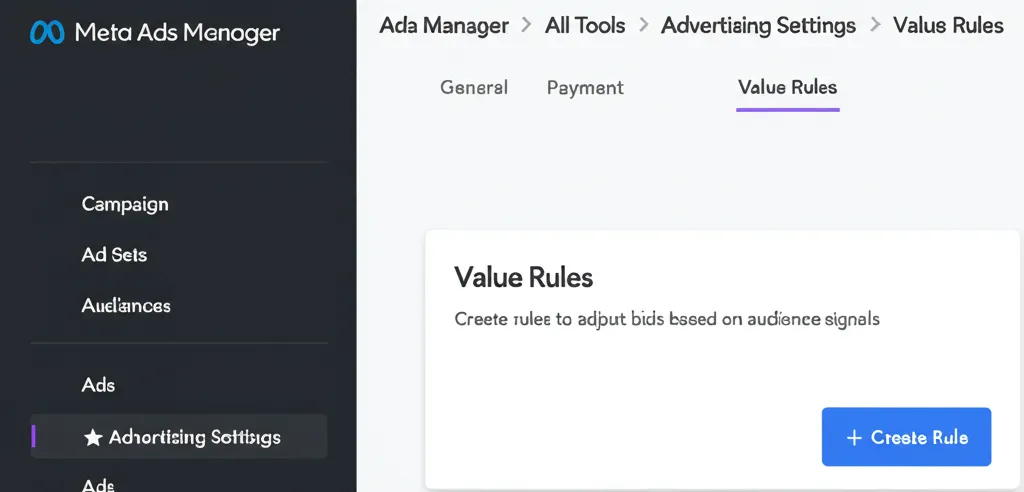
Ads Manager → Advertising Settings → Value Rules
Step 2: Create a New Rule Set Click "Create Rule Set" and name it descriptively (e.g., "High-LTV Customer Signals")
Step 3: Define Your Conditions You can combine up to TWO conditions per rule:
- Age range
- Gender
- Location (country, region, or city)
- Device type
Step 4: Set Your Adjustment Choose increase or decrease, then set the percentage.
Step 5: Prioritize Rules If multiple rules could apply, set priority order. Higher priority rules take precedence.
Step 6: Apply to Campaigns Attach the rule set to relevant campaigns.
Strategic Implementation
High-Value Customer Signals
What makes a customer high-value? Common signals:
:::tip High-Value Indicators
- Geographic location (higher income areas)
- Age ranges with higher LTV in your data
- Device type (iOS users often have higher purchase value)
- Returning visitors vs. new visitors :::
Example Rule Sets by Industry
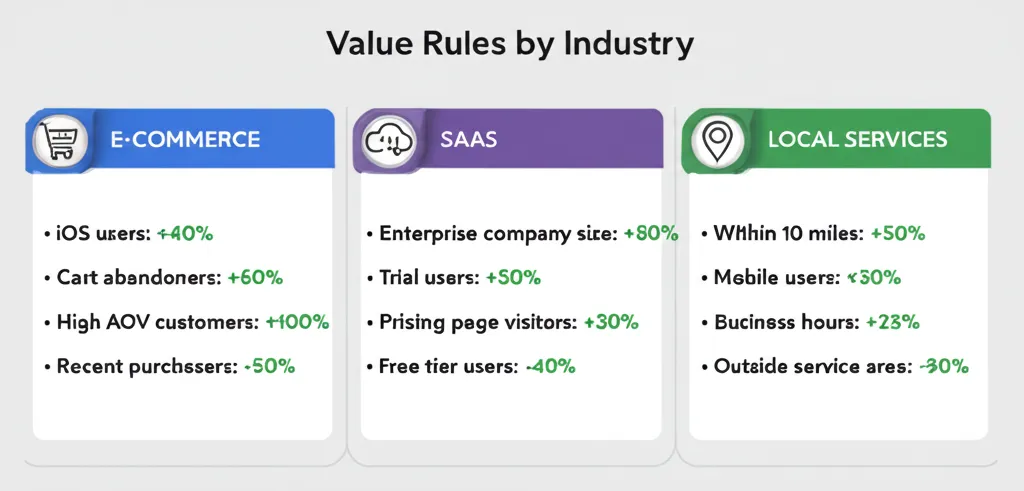
E-commerce:
- +75% for users in top 10 revenue zip codes
- +50% for age 25-44 (highest LTV segment)
- -50% for age 18-24 (high returns rate)
SaaS:
- +100% for enterprise-size company indicators
- +50% for desktop users (higher trial-to-paid rate)
- -30% for mobile users (lower conversion rate)
Local Services:
- +200% for users within 10-mile radius
- -75% for users outside service area
Common Mistakes to Avoid
:::warning Mistake #1: Over-Complicating Rules Start with 2-3 rules based on clear data signals. Don't create complex rule sets without validation. :::
:::warning Mistake #2: Misaligning with Objectives A traffic campaign with value rules for purchase behavior won't work. Match rules to your actual objective. :::
:::warning Mistake #3: Ignoring Post-Purchase Data You need to validate that your "high-value" signals actually correlate with business outcomes. Check LTV data quarterly. :::
:::warning Mistake #4: Frequent Rebuilding Every time you significantly change rules, campaigns may need to relearn. Make changes incrementally. :::
Measuring Value Rules Performance
In Ads Manager
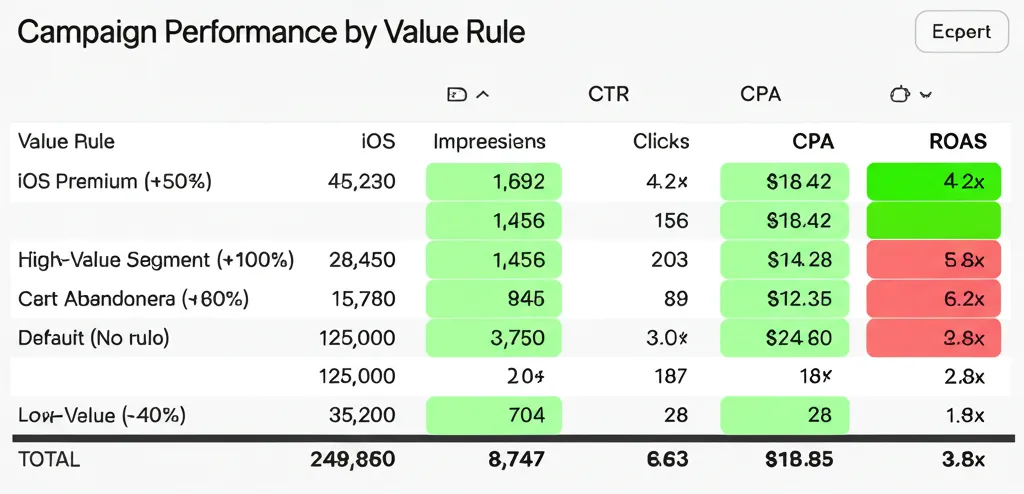
Use breakdowns to see performance by rule-matched vs. non-matched audiences:
- Breakdown → By Delivery → Value Rule
Key Metrics to Compare
| Metric | Rule-Matched | Non-Matched |
|---|---|---|
| CPA | Should be higher (you're paying more) | Baseline |
| ROAS | Should be higher (better customers) | Baseline |
| LTV | Validate over time | Baseline |
External Validation
Don't trust Meta's data alone. Cross-reference with:
- Google Analytics conversion data
- CRM customer lifetime value
- Post-purchase surveys
Advanced Strategies
A/B Testing Rule Sets
With six rule sets available, you can run controlled experiments:
- Rule Set A: Age-based adjustments
- Rule Set B: Location-based adjustments
- Rule Set C: Combined age + location
Apply each to similar campaigns and compare performance over 2-4 weeks.
Seasonal Adjustments
Create rule sets for different seasons:
- Holiday shoppers (higher intent, increase bids)
- Off-season browsers (lower intent, decrease bids)
Funnel Stage Rules
Different rules for different campaign types:
- Prospecting: Focus on demographic signals
- Retargeting: Focus on engagement depth signals
The Bottom Line
Value Rules represent a fundamental shift in how Meta campaigns can be optimized. Instead of letting the algorithm treat all conversions equally, you can inject your business knowledge into the bidding process.
:::tip Start Small Don't try to build the perfect rule set immediately. Start with one clear signal (your highest-LTV geographic area or age group), measure for 2-4 weeks, then iterate. :::
The advertisers who master Value Rules in 2026 will have a significant edge — they'll be acquiring better customers at the same or lower cost.
Want to see how your Value Rules are performing alongside all your other optimizations? AdBid's unified dashboard gives you the complete picture. Try AdBid free for 14 days.