
Part of our Meta Ads Platform guide series.
Key Takeaways
- Standard events are predefined by Meta and optimized for algorithm performance
- Custom events handle unique business actions that standard events can't cover
- Custom conversions add value attribution to standard events for granular optimization
- You can now optimize directly for custom events without creating custom conversions first
- Quality engagement events (scroll depth + time on page) create high-value targeting audiences
:::info The Events Hierarchy Standard Events → Meta-recognized triggers for common actions Custom Events → User-defined triggers for unique business logic Custom Conversions → Value overlays on either event type :::
For ongoing execution, AdBid's AI ads manager handles planning, launch, and continuous optimization from one dashboard.
Understanding the Three Event Types
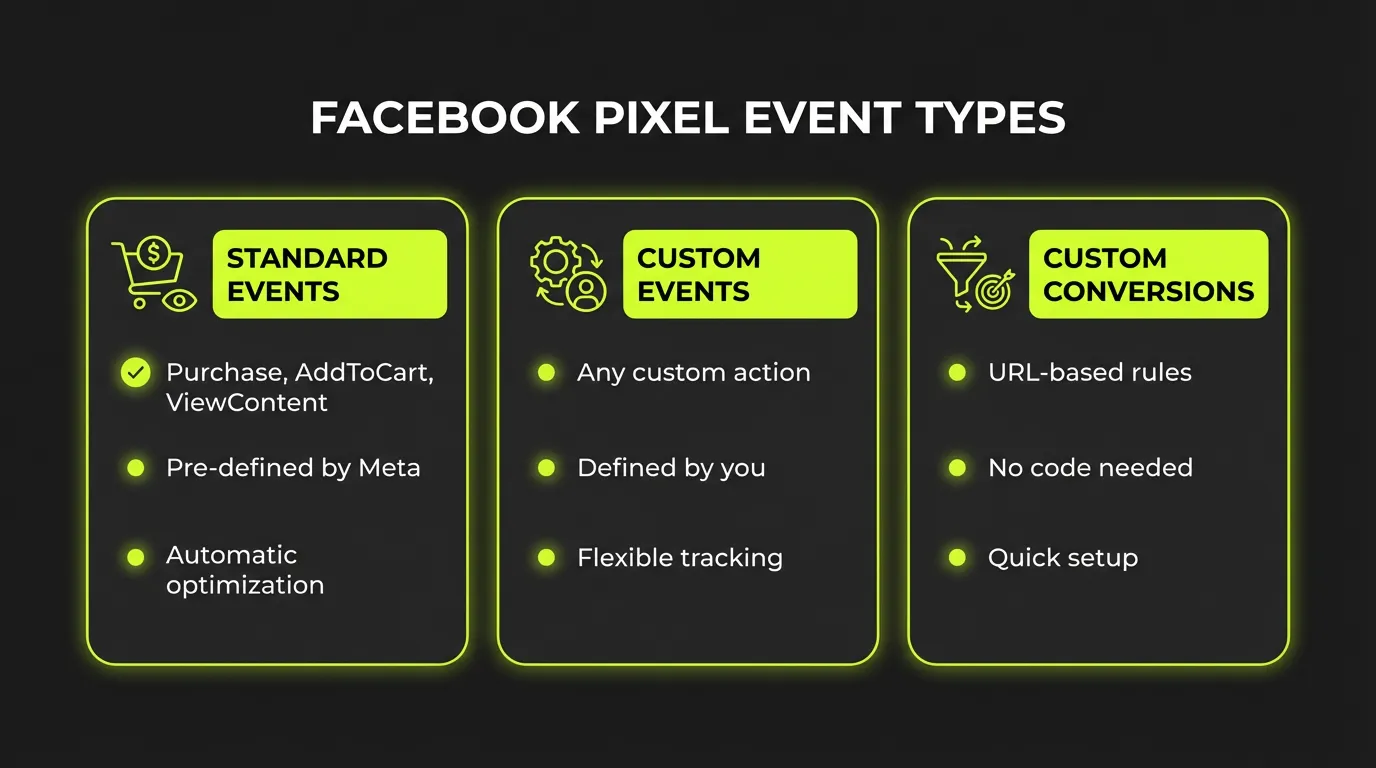
I've set up tracking for hundreds of ad accounts over the past five years. The single biggest mistake I see? Advertisers who don't understand the difference between these three event types — and misuse them.
Standard Events: Meta's Native Language
Standard events are predefined triggers that Meta's algorithm deeply understands. The platform has trained on billions of these events, so when you fire a "Purchase" event, Meta knows exactly what kind of user behavior leads there.
| Event | Purpose | When to Use |
|---|---|---|
| Purchase | Completed transaction | E-commerce sales |
| Lead | Form submission | Lead generation |
| CompleteRegistration | Signup completion | SaaS, memberships |
| AddToCart | Cart addition | E-commerce intent |
| ViewContent | Page view | High-value content |
| InitiateCheckout | Checkout start | Purchase intent |
| Search | Site search | Discovery behavior |
| Subscribe | Newsletter/subscription | Recurring revenue |
:::warning Critical Mistake Never create a custom event to replace a standard event. If an action is a purchase, use the Purchase standard event. Meta can't optimize as effectively for custom events that replicate standard ones. :::
Custom Events: When Standard Won't Do
Custom events handle unique business logic that standard events can't express. I use them for:
Engagement Quality Signals:
- Scroll depth thresholds (25%, 50%, 75%, 100%)
- Time on page milestones (30s, 60s, 120s)
- Video engagement points (specific play percentages)
- Content interaction sequences
Business-Specific Actions:
- Calculator completions
- Configurator saves
- Quiz completions
- Appointment requests (before formal lead)
"Thanks to a recent 2025 update, advertisers can now optimize for and track custom events directly in the ad set — without creating a custom conversion first." — Meta Business Help
Custom Event Code Example:
// Fire when user spends 2+ minutes AND scrolls 70%+
fbq('trackCustom', 'QualityVisit', {
  time_on_page: 120,
  scroll_depth: 70,
  content_type: 'blog_post'
});
Custom Conversions: Adding Value Context
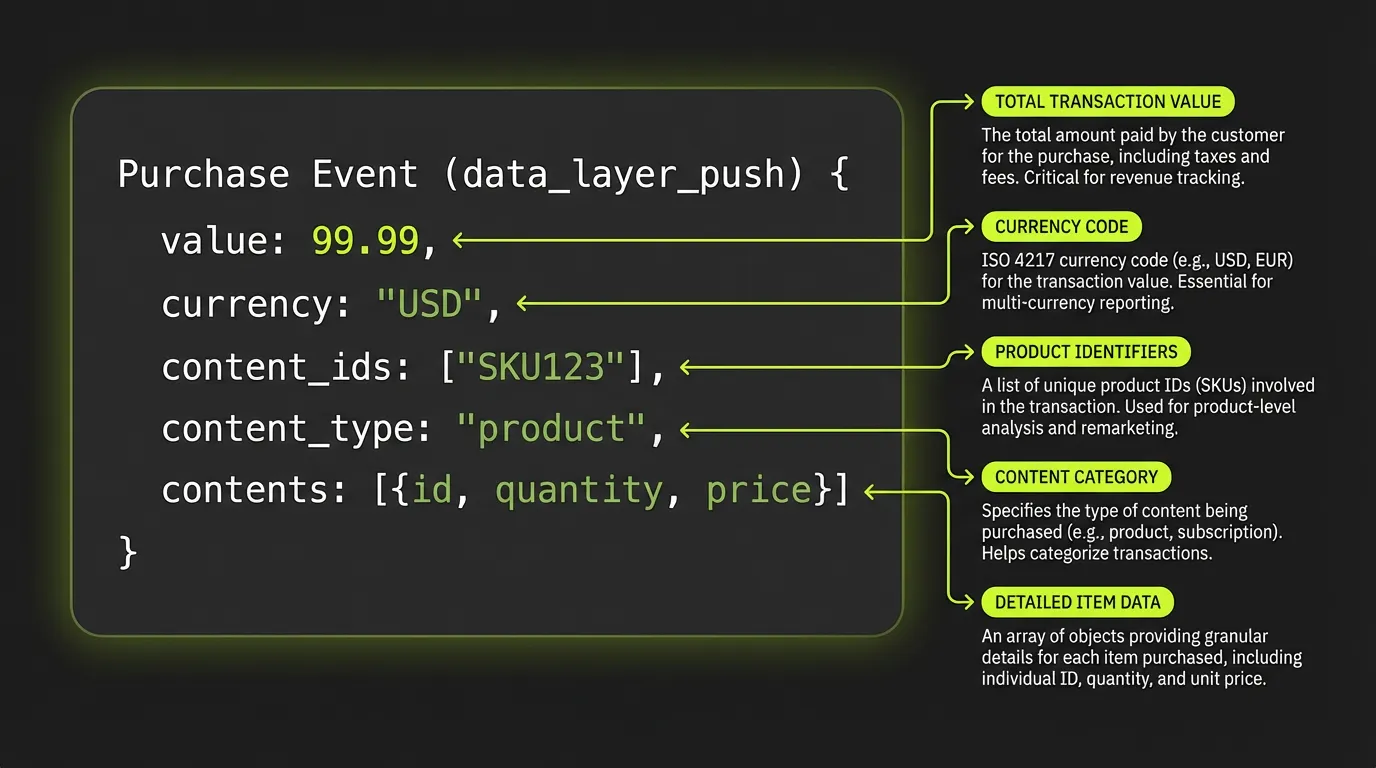
Custom conversions layer additional rules onto standard or custom events. They're perfect for:
- Distinguishing conversion values — A $500 product purchase vs. a $50 one
- Filtering by URL rules — Only purchases from specific product categories
- Setting conversion values — Tell Meta what each action is worth to you
:::tip Pro Optimization Instead of optimizing for any Purchase, create a custom conversion for "Purchases > $100" and optimize for that. You'll attract higher-value customers. :::
Advanced Custom Event Strategies
The Quality Traffic Event
This is my go-to custom event for content-heavy sites. It identifies visitors who actually engage, not just bounce:
let timeOnPage = 0;
let maxScroll = 0;

// Track time
setInterval(() => { timeOnPage += 1; }, 1000);

// Track scroll
window.addEventListener('scroll', () => {
  const scrollPct = (window.scrollY + window.innerHeight) / document.body.scrollHeight * 100;
  if (scrollPct > maxScroll) maxScroll = scrollPct;
});

// Fire event when conditions met
setInterval(() => {
  if (timeOnPage >= 120 && maxScroll >= 70 && !window.qualityEventFired) {
    fbq('trackCustom', 'QualityEngagement', {
      time_seconds: timeOnPage,
      scroll_percent: Math.round(maxScroll)
    });
    window.qualityEventFired = true;
  }
}, 5000);
Why This Works:
- Filters out accidental clicks and bots
- Creates a retargeting audience of truly engaged visitors
- Lookalike audiences based on engagement quality outperform page-view lookalikes
Sequential Event Funnels
Track multi-step journeys with custom events:
| Event Sequence | What It Reveals |
|---|---|
| ViewContent → AddToCart | Interest-to-intent conversion |
| QuizStart → QuizComplete | Engagement quality |
| ArticleView → QualityVisit → Lead | Content-to-conversion path |
| Search → ViewContent → AddToCart | Discovery journey |
:::highlight Case Study One e-commerce client found that users who triggered "QuizComplete" before viewing products had 3.2x higher AOV. We built lookalike audiences from this specific sequence. :::
Event Parameters: The Hidden Optimization Lever
Most advertisers fire events without parameters. That's leaving money on the table.
Essential Parameters
fbq('track', 'Purchase', {
  value: 127.50,
  currency: 'USD',
  content_type: 'product',
  content_ids: ['SKU123', 'SKU456'],
  content_name: 'Premium Widget Set',
  num_items: 2,
  content_category: 'Electronics',
  predicted_ltv: 450.00
});
Parameter Benefits:
- value — Enables ROAS optimization
- content_type — Powers Dynamic Ads
- content_ids — Product-level retargeting
- predicted_ltv — Value-based optimization signals
Custom Parameters for Business Context
fbq('track', 'Lead', {
  value: 50.00,
  currency: 'USD',
  lead_type: 'demo_request',
  company_size: 'enterprise',
  industry: 'saas',
  lead_score: 85
});
:::warning Parameter Quality Matters Meta uses parameters for optimization. Inaccurate data (wrong values, missing parameters) degrades algorithm performance. Audit regularly. :::
Custom Conversions: Optimization Granularity
When to Use Custom Conversions
| Scenario | Custom Conversion Setup |
|---|---|
| High-value purchases only | Purchase where value > $100 |
| Specific product category | Purchase where URL contains "/premium/" |
| Lead type differentiation | Lead where URL contains "/enterprise-demo" |
| Content conversion | ViewContent where URL contains "/pricing" |
Setting Up Custom Conversions
- Go to Events Manager → Custom Conversions
- Select base event (standard or custom)
- Add URL or parameter rules
- Assign a conversion value
- Enable optimization in ad sets
:::tip Conversion Value Strategy Set custom conversion values based on actual LTV, not gut feel. A "demo request" lead might be worth $500 if 10% close at $5,000 average. :::
Event Quality & Debugging
Diagnosing Event Issues
Common Problems I See:
- Duplicate events — Same event firing multiple times per action
- Missing parameters — Events without value or content data
- Wrong event timing — Purchase firing on page load, not checkout complete
- Browser-only events — No server-side backup for iOS users
Debugging Tools:
| Tool | Purpose |
|---|---|
| Meta Pixel Helper | Real-time browser event verification |
| Test Events | Sandbox testing before production |
| Event Overview | Historical event volume and trends |
| Diagnostics | Platform-identified configuration issues |
Event Match Quality (EMQ)
Event Match Quality scores how well your events match to Facebook users. Higher EMQ = better optimization.
Improving EMQ:
- Send customer information parameters (email, phone, hashed)
- Implement Conversions API alongside pixel
- Use consistent data formatting (lowercase emails, E.164 phone)
- Pass user ID when available
:::info EMQ Scoring
| EMQ Score | Quality | Action |
|---|---|---|
| 8-10 | Excellent | Maintain current setup |
| 6-7 | Good | Minor improvements possible |
| 4-5 | Fair | Add more customer data parameters |
| 1-3 | Poor | Urgent: Implement CAPI + data enrichment |
| ::: |
Server-Side Events with Conversions API
Browser-based pixels miss events due to:
- Ad blockers (15-25% of users)
- iOS tracking prevention
- Browser privacy settings
- Page load failures
CAPI Implementation
// Server-side event (Node.js example)
const bizSdk = require('facebook-nodejs-business-sdk');

const access_token = 'YOUR_ACCESS_TOKEN';
const pixel_id = 'YOUR_PIXEL_ID';
const api = bizSdk.FacebookAdsApi.init(access_token);

const ServerEvent = bizSdk.ServerEvent;
const EventRequest = bizSdk.EventRequest;
const UserData = bizSdk.UserData;
const CustomData = bizSdk.CustomData;

const userData = (new UserData())
  .setEmail('customer@example.com')
  .setPhone('15551234567')
  .setClientIpAddress(req.ip)
  .setClientUserAgent(req.headers['user-agent']);

const customData = (new CustomData())
  .setCurrency('usd')
  .setValue(120.00);

const serverEvent = (new ServerEvent())
  .setEventName('Purchase')
  .setEventTime(Math.floor(Date.now() / 1000))
  .setUserData(userData)
  .setCustomData(customData)
  .setActionSource('website');

const eventsData = [serverEvent];
const eventRequest = (new EventRequest(access_token, pixel_id))
  .setEvents(eventsData);

eventRequest.execute();
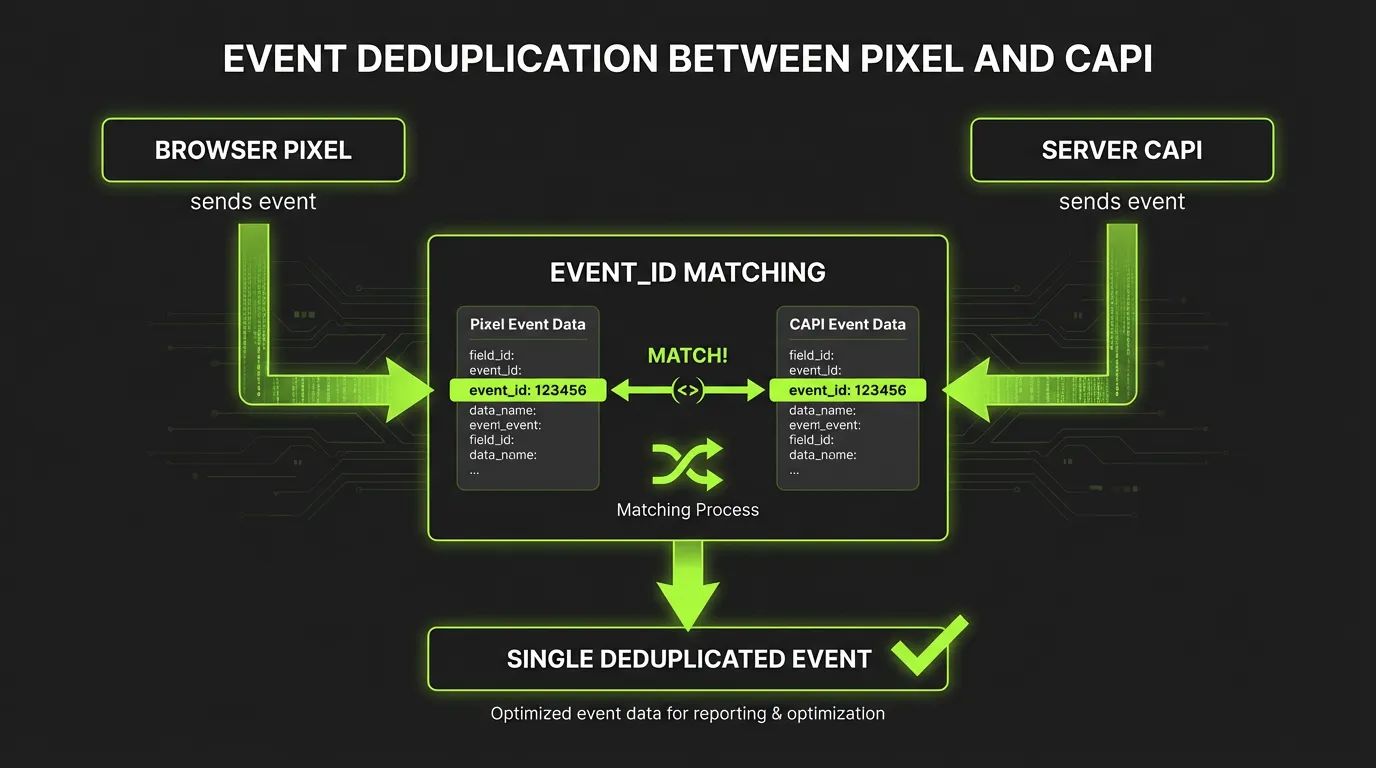
:::highlight Deduplication Critical When running both Pixel and CAPI, use event_id to deduplicate. Same event_id = Meta counts it once. :::
Optimization Strategies by Event Type
Funnel-Stage Optimization
| Funnel Stage | Optimize For | Event Type |
|---|---|---|
| Awareness | QualityVisit | Custom Event |
| Consideration | ViewContent with engagement | Standard + Parameters |
| Intent | AddToCart, InitiateCheckout | Standard |
| Conversion | Purchase with value | Standard + Parameters |
| Retention | RepeatPurchase | Custom Event |
When to Optimize for Custom Events
Thanks to Meta's 2025 update, you can now directly select custom events for optimization:
- Mid-funnel optimization — When bottom-funnel volume is too low
- Engagement campaigns — Quality visits, content consumption
- App-specific actions — In-app behaviors unique to your product
- B2B longer cycles — Demo requests, content downloads
:::warning Volume Requirements Any event you optimize for needs 50+ conversions per week for stable optimization. If custom events have low volume, use custom conversions with broader rules. :::
Advanced Techniques
Dynamic Event Values
Don't hard-code event values. Pull actual data:
// After purchase confirmation
const orderValue = parseFloat(document.getElementById('order-total').textContent);
const productIds = Array.from(document.querySelectorAll('.product-id')).map(el => el.dataset.sku);

fbq('track', 'Purchase', {
  value: orderValue,
  currency: 'USD',
  content_ids: productIds,
  content_type: 'product',
  num_items: productIds.length
});
Predicted LTV Events
For subscription businesses, send predicted lifetime value:
fbq('track', 'Subscribe', {
  value: 29.99, // Monthly price
  currency: 'USD',
  predicted_ltv: 299.90, // 10-month average retention
  content_name: 'Pro Plan',
  subscription_id: 'SUB_123456'
});
Offline Conversions
Sync offline sales back to Meta for full-funnel attribution:
- Export customer email/phone + purchase data
- Upload via Offline Events or Conversions API
- Match window: 28 days click, 1 day view
- Include all transaction details for value optimization
The Bottom Line
Mastering Facebook Pixel events in 2026 means:
- Use standard events correctly — They're optimized for Meta's algorithm
- Custom events for unique logic — Engagement quality, business-specific actions
- Custom conversions for value segmentation — Differentiate high-value from low-value
- Always pass parameters — Value, content_ids, customer data
- Implement CAPI — Browser pixels alone miss 15-25% of events
- Audit regularly — Event quality degrades silently over time
"All non-human and fraudulent traffic is invalid. Ensure your events track real users with genuine intent — not bots or accidental clicks."
AdBid monitors your pixel events across all accounts, alerting you to EMQ drops, missing parameters, and tracking gaps. See your event health.