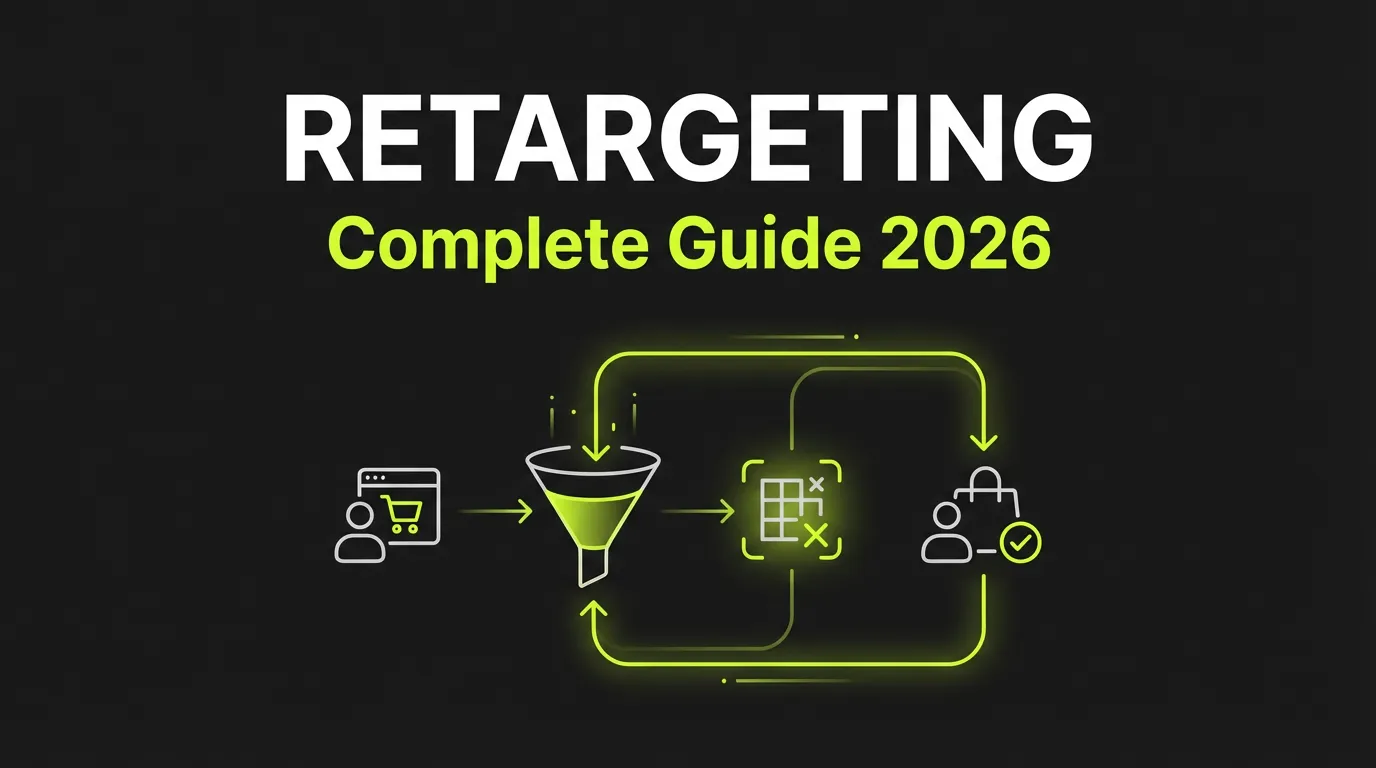

Retargeting Ads: Complete Strategy Guide for 2026
Retargeting (also called remarketing) is one of the most effective digital advertising strategies. By reaching people who have already shown interest in your brand, retargeting delivers higher conversion rates and better ROI than cold traffic campaigns.
Once you're ready to scale, AdBid gives you the workflow to plan, launch, and optimize without adding headcount.
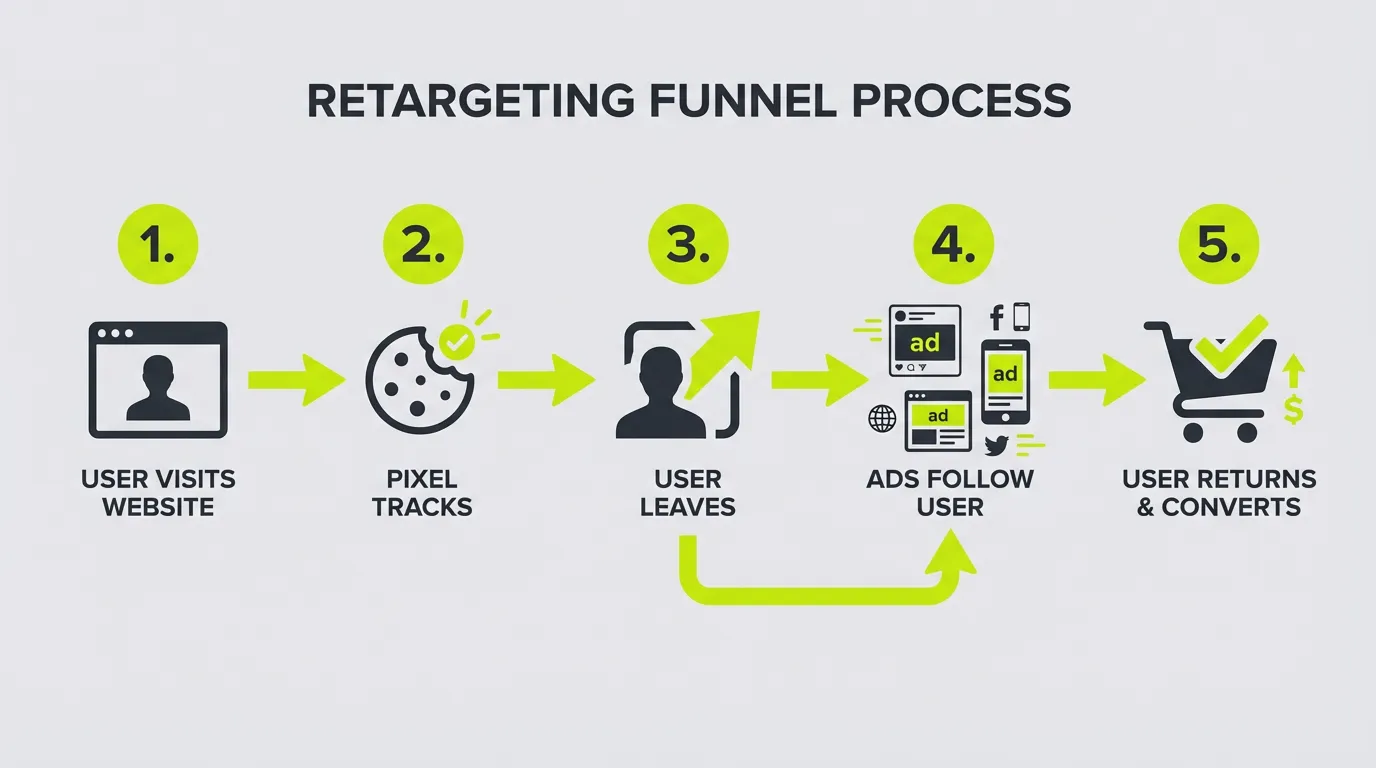
What is Retargeting?
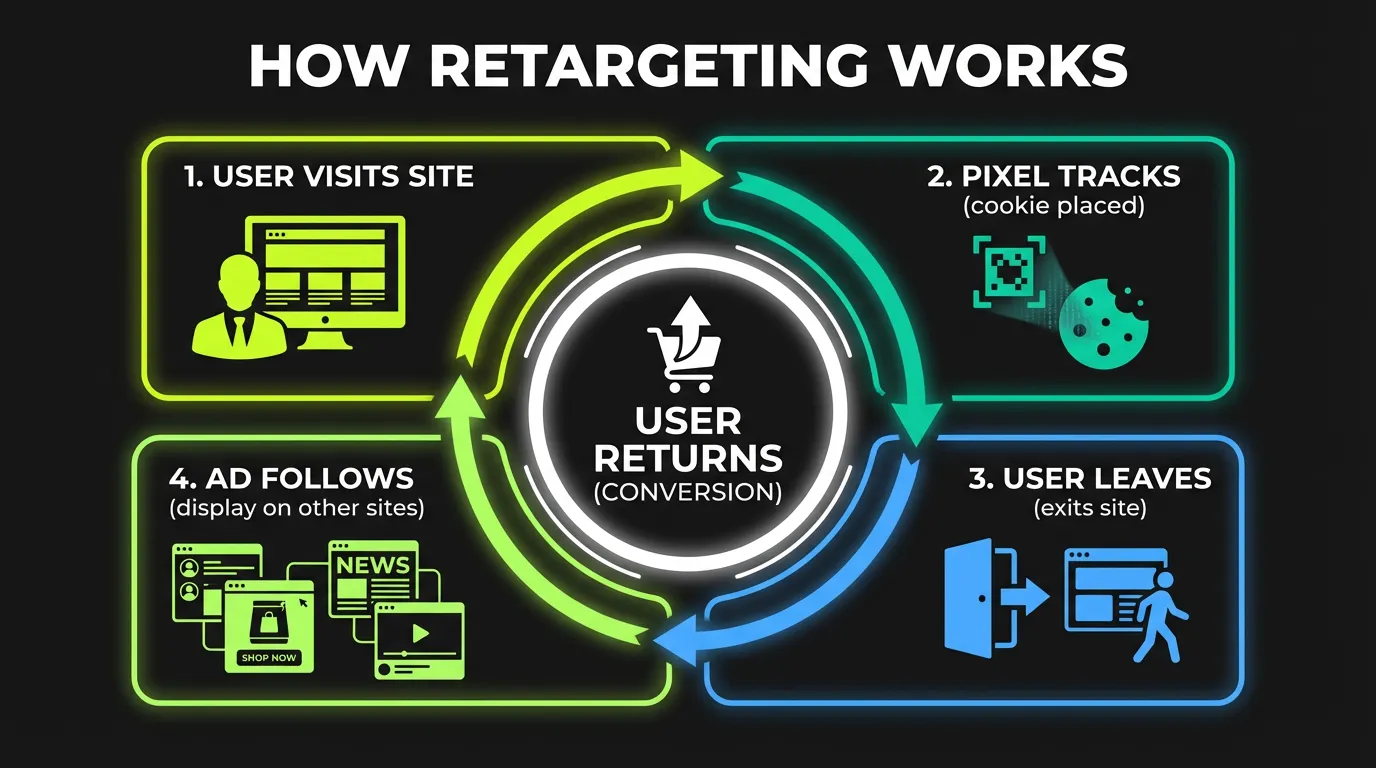
Retargeting is an advertising strategy that shows ads to people who have previously interacted with your brand—visited your website, engaged with your content, or started but didn't complete a purchase.
Retargeting vs. Remarketing
Technically:
- Retargeting: Typically refers to display/social ads using pixel data
- Remarketing: Originally meant email marketing to past customers
In practice: The terms are used interchangeably to describe re-engaging past visitors.
Why Retargeting Works
The psychology:
- Familiarity: People prefer known brands
- Timing: Catch users when ready to buy
- Intent: Previous interaction signals interest
- Reminder: Keep your brand top-of-mind
The numbers:
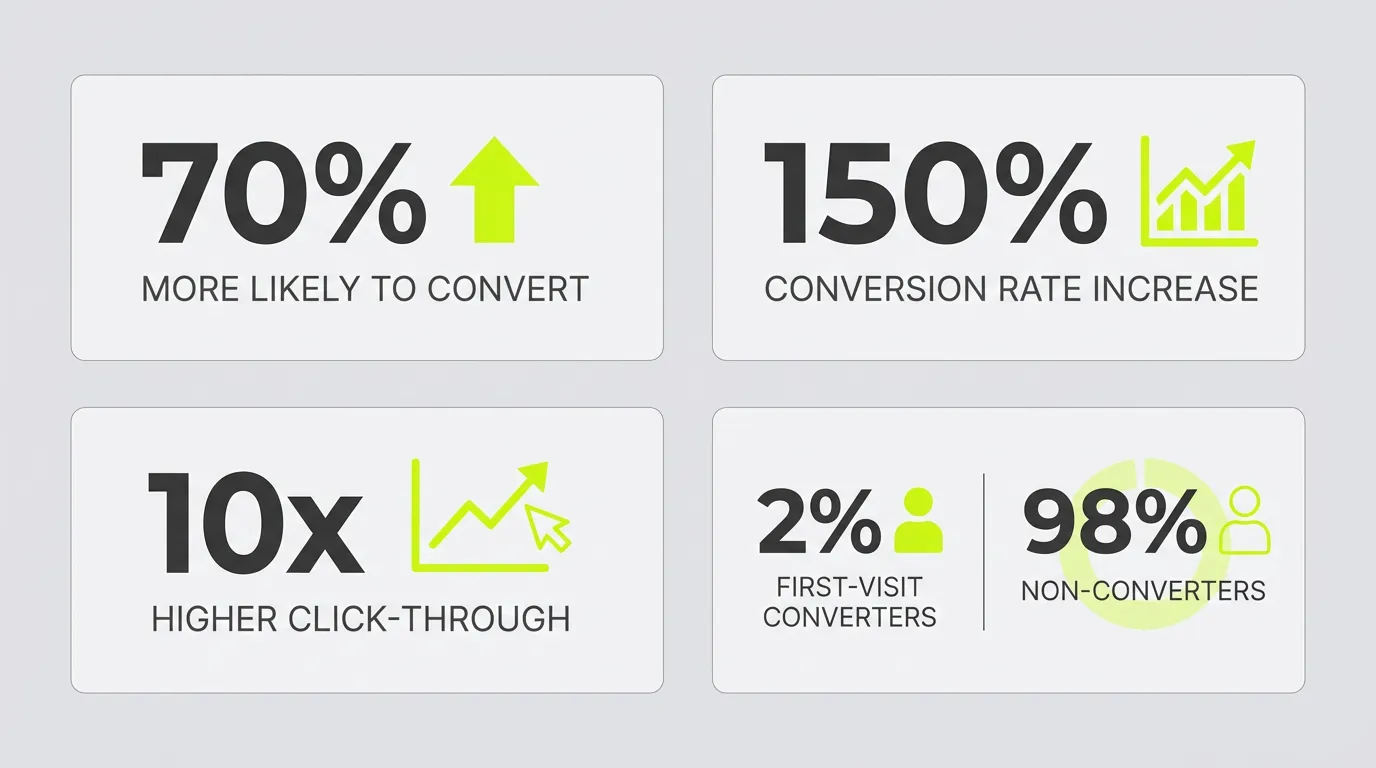
- Only 2% of visitors convert on first visit
- Retargeted visitors are 70% more likely to convert (Invesp)
- Retargeting can increase conversion rates by 150%
- Average CTR for retargeting: 0.7% (vs 0.07% for display) (Invesp)
Types of Retargeting
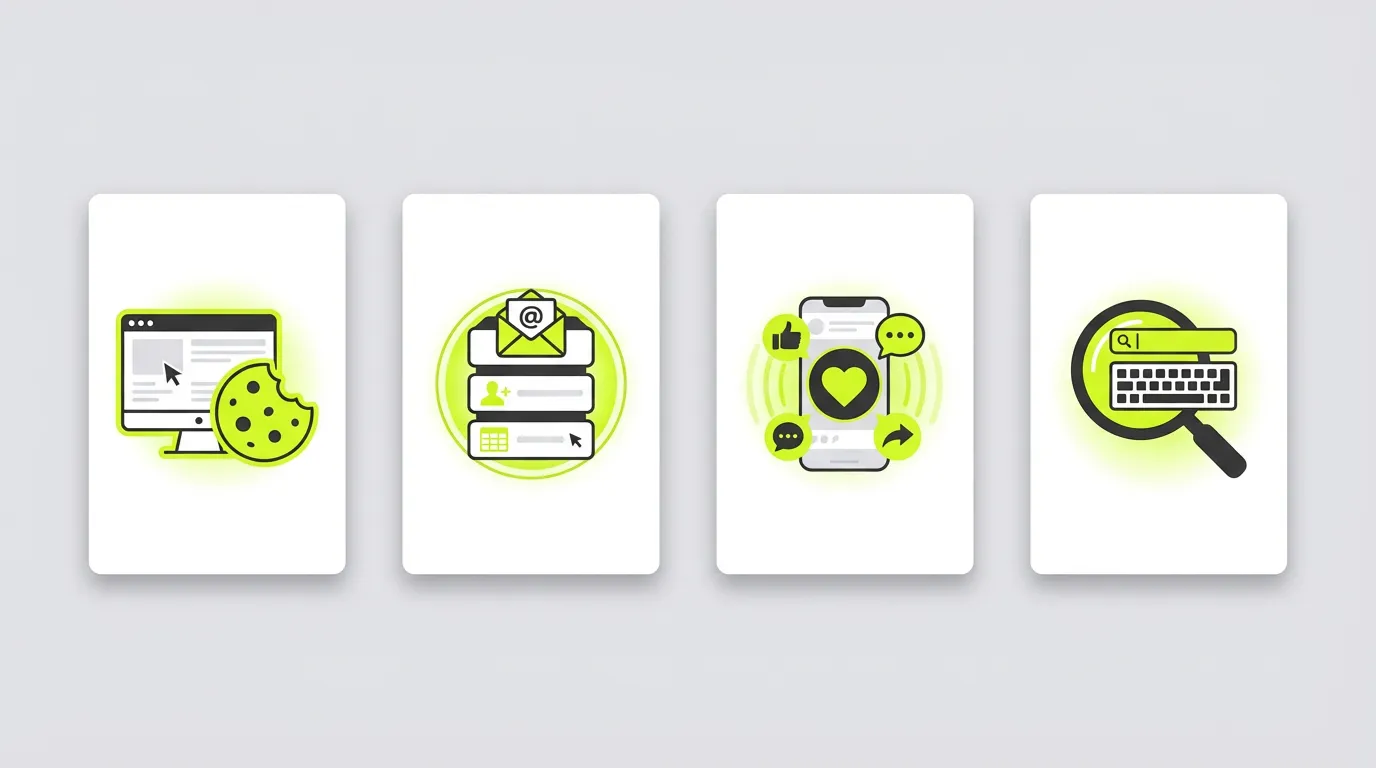
1. Pixel-Based Retargeting
How it works:
- Install tracking pixel on your website
- Pixel drops cookie on visitor's browser
- Visitor sees your ads on other sites/platforms
- Click brings them back to convert
Best for:
- Website visitors who didn't convert
- Product page abandoners
- Cart abandoners
- Blog readers
2. List-Based Retargeting
How it works:
- Upload email/phone list to ad platform
- Platform matches to user profiles
- Show ads to matched users
- Re-engage existing customers
Best for:
- Past customers
- Email subscribers
- CRM contacts
- Event attendees
3. Engagement Retargeting
How it works:
- Track social media engagement
- Create audiences from engagers
- Target video viewers, page visitors, ad clickers
- Move them down the funnel
Best for:
- Video viewers
- Social media engagers
- Ad interactors
- Lead form abandoners
4. Search Retargeting
How it works:
- Target users who searched specific keywords
- Show ads based on search intent
- Reach users who didn't visit your site
- Capture competitor searches
Best for:
- Reaching new audiences with intent
- Competitor conquesting
- Expanding top of funnel
Setting Up Retargeting by Platform
Facebook/Meta Retargeting
Step 1: Install the Meta Pixel
<!-- Meta Pixel Code -->
<script>
!function(f,b,e,v,n,t,s)
{if(f.fbq)return;n=f.fbq=function(){n.callMethod?
n.callMethod.apply(n,arguments):n.queue.push(arguments)};
if(!f._fbq)f._fbq=n;n.push=n;n.loaded=!0;n.version='2.0';
n.queue=[];t=b.createElement(e);t.async=!0;
t.src=v;s=b.getElementsByTagName(e)[0];
s.parentNode.insertBefore(t,s)}(window, document,'script',
'https://connect.facebook.net/en_US/fbevents.js');
fbq('init', 'YOUR_PIXEL_ID');
fbq('track', 'PageView');
</script>
Step 2: Set Up Conversions API
For better tracking accuracy (especially iOS 14+):
- Server-side event tracking
- Improved match rates
- Better attribution
Step 3: Create Custom Audiences
Website visitors:
- All visitors (180 days max)
- Specific page visitors
- Time-based segments
- Event-based (add to cart, purchase)
Engagement audiences:
- Video viewers (25%, 50%, 75%, 95%)
- Page/profile visitors
- Ad engagers
- Instagram engagers
Google Ads Retargeting
Step 1: Install Google Tag
<!-- Google tag (gtag.js) -->
<script async src="https://www.googletagmanager.com/gtag/js?id=AW-CONVERSION_ID"></script>
<script>
  window.dataLayer = window.dataLayer || [];
  function gtag(){dataLayer.push(arguments);}
  gtag('js', new Date());
  gtag('config', 'AW-CONVERSION_ID');
</script>
Step 2: Create Remarketing Lists
Options:
- Website visitors
- App users
- Customer lists
- YouTube users
Step 3: Campaign Types
- Display remarketing: Banner ads across Google Display Network
- Search remarketing (RLSA): Adjust search bids for past visitors
- Video remarketing: YouTube ads to past visitors
- Shopping remarketing: Dynamic product ads
TikTok Retargeting
Step 1: Install TikTok Pixel
<script>
!function (w, d, t) {
  w.TiktokAnalyticsObject=t;var ttq=w[t]=w[t]||[];
  ttq.methods=["page","track","identify","instances","debug","on","off","once","ready","alias","group","enableCookie","disableCookie"];
  ttq.setAndDefer=function(t,e){t[e]=function(){t.push([e].concat(Array.prototype.slice.call(arguments,0)))}};
  for(var i=0;i<ttq.methods.length;i++)ttq.setAndDefer(ttq,ttq.methods[i]);
  ttq.instance=function(t){for(var e=ttq._i[t]||[],n=0;n<ttq.methods.length;n++)ttq.setAndDefer(e,ttq.methods[n]);return e};
  ttq.load=function(e,n){var i="https://analytics.tiktok.com/i18n/pixel/events.js";
  ttq._i=ttq._i||{};ttq._i[e]=[];ttq._i[e]._u=i;
  ttq._t=ttq._t||{};ttq._t[e]=+new Date;
  ttq._o=ttq._o||{};ttq._o[e]=n||{};
  var o=document.createElement("script");o.type="text/javascript";o.async=!0;o.src=i+"?sdkid="+e+"&lib="+t;
  var a=document.getElementsByTagName("script")[0];a.parentNode.insertBefore(o,a)};
  ttq.load('YOUR_PIXEL_ID');
  ttq.page();
}(window, document, 'ttq');
</script>
Step 2: Create Custom Audiences
- Website traffic
- Customer file upload
- Engagement (video views, profile visits)
- App activity
Retargeting Funnel Strategy
Top of Funnel (Awareness → Interest)
Audience: All website visitors Objective: Brand awareness, engagement Creative: Educational content, brand story Duration: 30-90 days from visit
Middle of Funnel (Interest → Consideration)
Audience: Engaged visitors (2+ pages, time on site) Objective: Traffic, lead generation Creative: Product benefits, testimonials Duration: 14-30 days from engagement
Bottom of Funnel (Consideration → Conversion)
Audience: High-intent visitors (product pages, cart) Objective: Conversions Creative: Offers, urgency, social proof Duration: 7-14 days from action
Post-Purchase (Retention → Advocacy)
Audience: Past customers Objective: Repeat purchase, upsell Creative: New products, loyalty offers Duration: 30-180 days from purchase
Advanced Retargeting Strategies
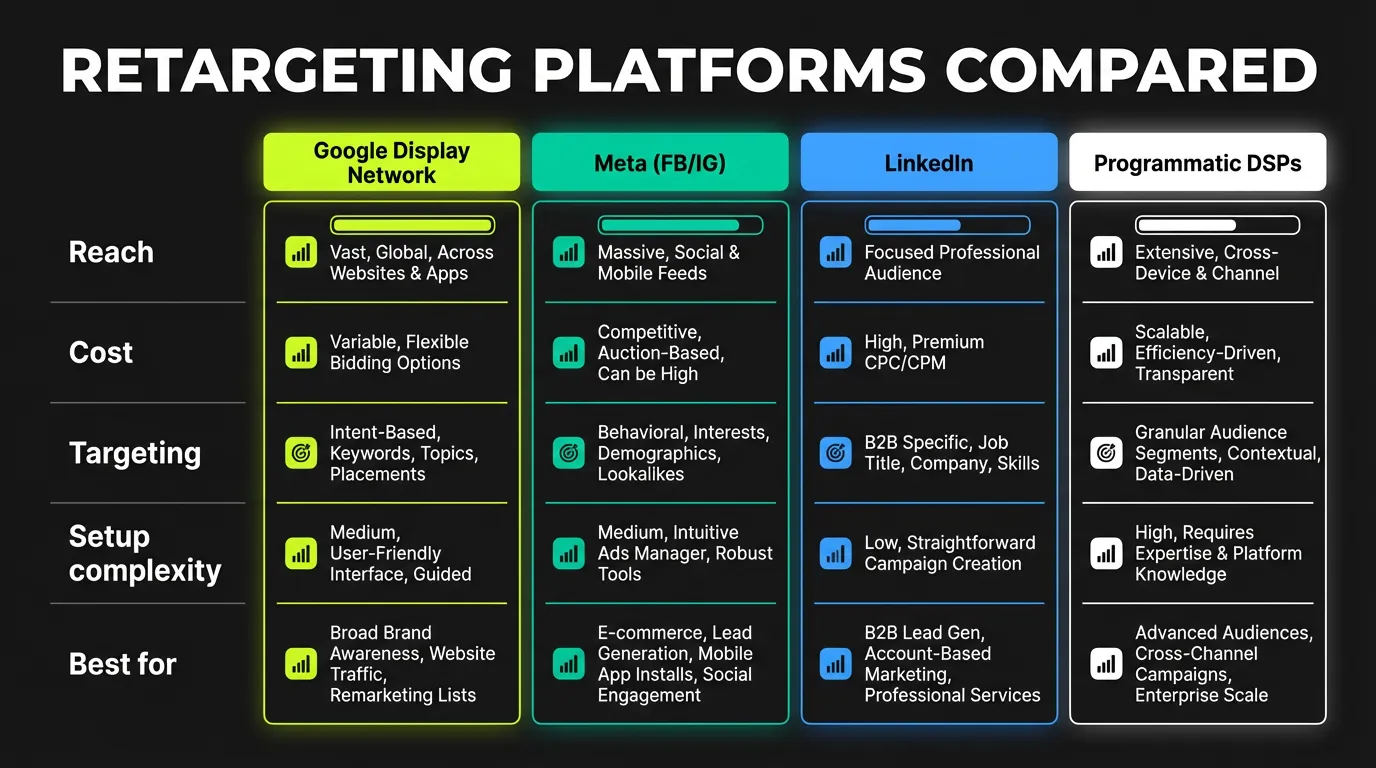
1. Sequential Retargeting
Show different messages based on previous ad exposure:
Sequence example:
- Day 1-3: Brand awareness ad
- Day 4-7: Product benefits ad
- Day 8-14: Social proof ad
- Day 15+: Offer/discount ad
2. Dynamic Product Retargeting
Show specific products users viewed:
Setup requirements:
- Product catalog upload
- Pixel events (ViewContent, AddToCart)
- Dynamic ad template
Benefits:
- Highly relevant ads
- Automated creative
- Scalable for large catalogs
3. Cross-Sell/Upsell Retargeting
Target based on purchase history:
Examples:
- Bought shoes → Show accessories
- Bought starter plan → Show upgrade
- Bought once → Show complementary products
4. Exclusion Audiences
Exclude to avoid wasting budget:
Critical exclusions:
- Recent purchasers (7-30 days)
- Employees
- Existing subscribers
- Irrelevant visitors (careers page, etc.)
Retargeting Creative Best Practices
For Cart Abandoners
Elements that work:
- Show the exact product left behind
- Include current price
- Add urgency (limited stock, time-limited discount)
- Offer free shipping threshold
- Social proof (reviews, ratings)
Example copy:
"Still thinking about it? Your [Product] is waiting. Complete your order in the next 24 hours for free shipping."
For Product Page Visitors
Elements that work:
- Product imagery
- Key benefits (not features)
- Testimonials from similar customers
- Comparison to alternatives
- Risk reversers (guarantee, returns)
Example copy:
"[Product] - Loved by 50,000+ customers. See why they made the switch."
For Blog Readers
Elements that work:
- Related content or products
- Lead magnet offers
- Free trial/demo
- Educational value add
Example copy:
"Enjoyed our guide on [Topic]? See how [Product] makes it even easier."
Creative Fatigue Solutions
Signs of fatigue:
- Declining CTR
- Increasing frequency
- Higher CPA
Solutions:
- Rotate creatives every 2-4 weeks
- Use dynamic creative
- Test different formats (video, carousel, etc.)
- Refresh messaging angles
- Update visuals seasonally
Retargeting Budgets and Bidding
Budget Allocation
Recommended split:
| Funnel Stage | % of Budget |
|---|---|
| Prospecting | 60-70% |
| Retargeting | 30-40% |
Within retargeting:
| Audience | % of Retargeting Budget |
|---|---|
| Cart abandoners | 40% |
| Product viewers | 30% |
| All visitors | 20% |
| Past customers | 10% |
Bidding Strategies
Platform recommendations:
Facebook/Meta:
- Use "Conversions" objective
- Start with lowest cost
- Move to cost cap once baseline established
Google:
- Target CPA bidding for conversions
- Enhanced CPC for control
- Maximize conversions for volume
TikTok:
- Start with bid cap
- Test lowest cost
- Use conversion optimization
Frequency Caps
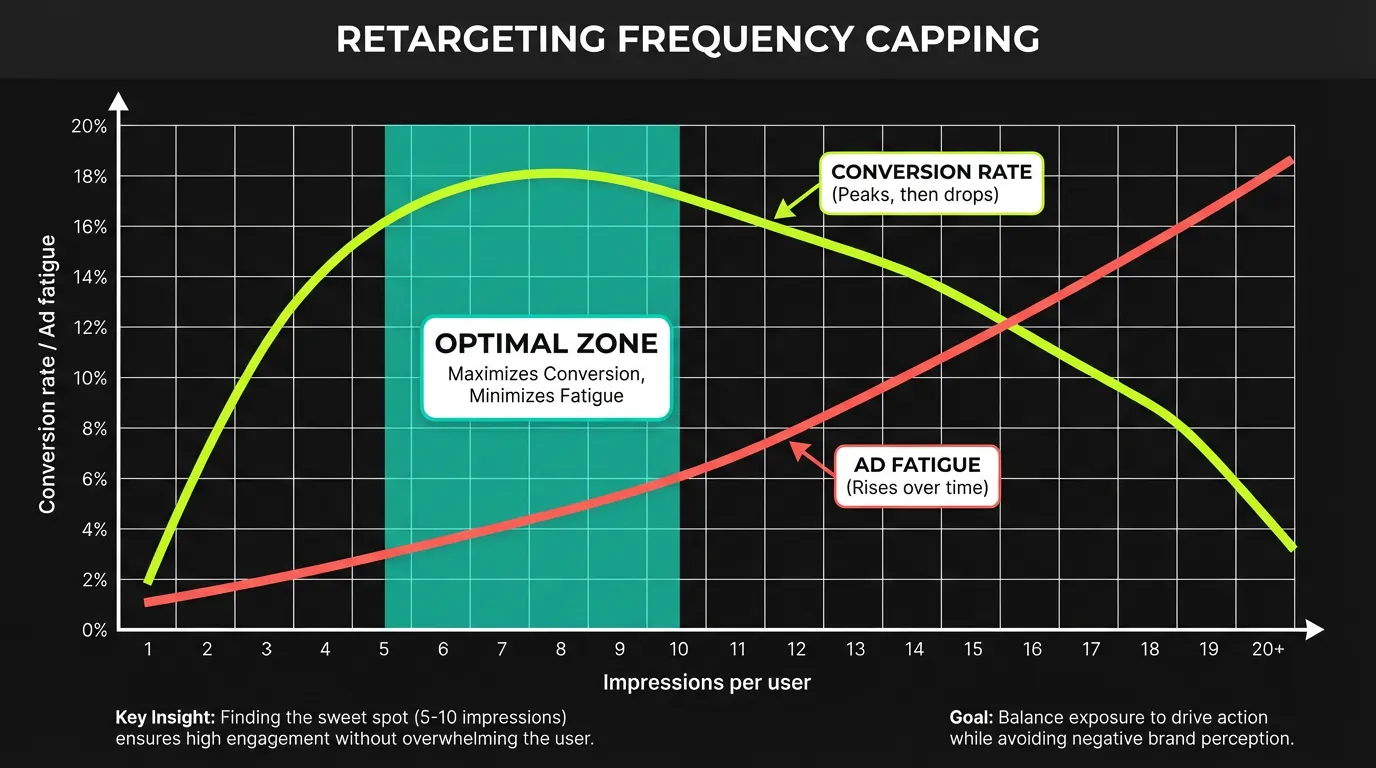
Recommended caps:
- Brand awareness: 3-5/week
- Consideration: 5-7/week
- Conversion: 7-10/week
- Cart abandoners: Up to 2/day for 3 days
Measuring Retargeting Success
Key Metrics
| Metric | Target (Retargeting) | vs Cold Traffic |
|---|---|---|
| CTR | 0.5-1.5% | 2-3x higher |
| Conversion Rate | 2-5% | 3-5x higher |
| CPA | 30-50% lower | Baseline |
| ROAS | 3-8x | 2-3x higher |
| Frequency | 3-10 | N/A |
Attribution Considerations
Window settings:
- Click: 7-28 days
- View: 1 day (iOS 14+) or 7 days
Attribution models:
- Last click: Undervalues retargeting
- Linear: More accurate for retargeting
- Data-driven: Best for optimization
Incrementality Testing
Why it matters: Retargeting often gets credit for conversions that would have happened anyway.
Testing methods:
- Holdout tests (exclude 10% of audience)
- Geographic tests
- On/off tests (risky)
- Ghost bid tests
Privacy and Retargeting in 2026
iOS 14+ Impact
Changes:
- ATT consent required
- Smaller audiences
- Delayed reporting
- Aggregated data
Solutions:
- Conversions API (CAPI)
- First-party data focus
- Contextual targeting
- Model-based audiences
Cookie Deprecation
Timeline: Ongoing, varies by browser
Preparation:
- Build first-party data
- Use server-side tracking
- Leverage identity solutions
- Test contextual alternatives
Privacy-First Retargeting
Best practices:
- Clear privacy policy
- Easy opt-out
- Respectful frequency
- Value-exchange messaging
- Compliance with GDPR/CCPA
Common Retargeting Mistakes
Mistake 1: No Audience Segmentation
Problem: Same message to all visitors Solution: Segment by behavior, recency, value
Mistake 2: Too Aggressive Frequency
Problem: Ad fatigue, negative brand perception Solution: Set frequency caps, exclude converters
Mistake 3: Ignoring the Buying Cycle
Problem: Pushing conversion on new visitors Solution: Match message to funnel stage
Mistake 4: No Creative Refresh
Problem: Same ads for months Solution: Rotate creatives every 2-4 weeks
Mistake 5: Not Excluding Converters
Problem: Wasted spend, annoyed customers Solution: Exclude recent purchasers (7-30 days)
Key Takeaways
- Retargeting delivers higher ROI than cold traffic campaigns
- Segment your audiences for relevant messaging
- Match creative to funnel stage for better results
- Set frequency caps to avoid fatigue
- Always exclude converters to maximize efficiency
- Test incrementality to measure true impact
- Prepare for privacy changes with first-party data
The 2026 Retargeting Landscape
:::highlight The New Reality Third-party cookies and generic intent signals are fading fast. Your own first-party data is your edge. The advertisers winning at retargeting are the ones with robust data collection and smart segmentation. :::
I've managed retargeting budgets from $10K to $500K monthly. The gap between brands doing it well and brands doing it poorly has never been wider.
Putting this into production across campaigns is what AdBid is for — one place to plan, automate, and report.
Retargeting vs. Remarketing
The Distinction
Retargeting:
- Serving ads to website visitors who didn't convert
- Uses cookies and pixels
- Focuses on bringing people back to site
Remarketing:
- Re-engaging past customers via email
- Uses owned customer data
- Focuses on repeat purchases and retention
Both work together. The best strategies integrate both approaches.
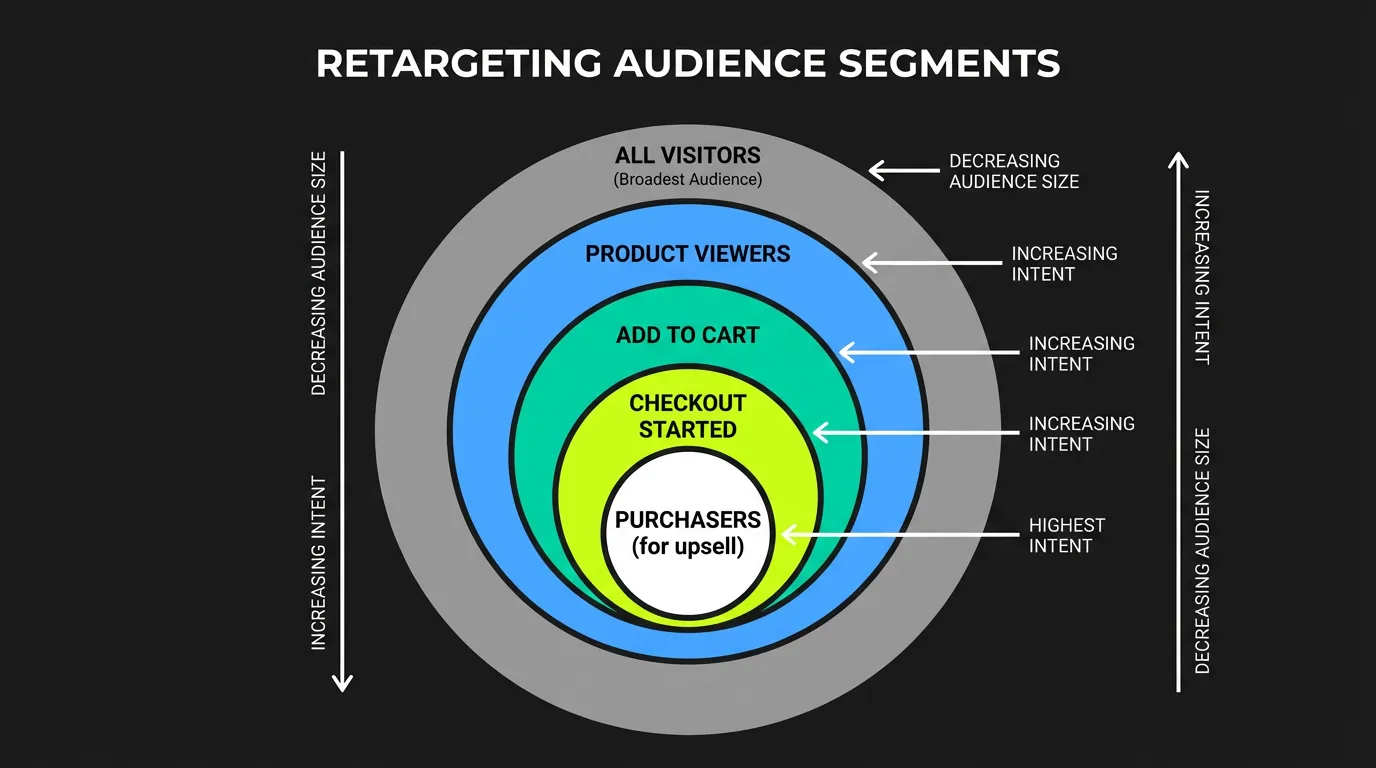
Segmentation: The Foundation
Why It Matters
:::warning The Waste Problem Showing the same ad to everyone is a guaranteed way to waste budget. Segmentation turns retargeting into relevance. :::
According to research, 77% of ROI comes from segmented, targeted, and triggered campaigns. Generic retargeting wastes money and annoys users.
Key Segments to Create
| Segment | Definition | Approach |
|---|---|---|
| Bouncers | Visited 1 page, left | Light touch, value proposition |
| Browsers | Multiple pages, no action | Product-focused, soft CTA |
| Cart Abandoners | Added to cart, didn't buy | Urgency, incentives, trust |
| Checkout Abandoners | Started checkout, didn't finish | Friction removal, support |
| Past Purchasers | Bought before | Cross-sell, upsell, loyalty |
| High-Intent | Viewed pricing, demo, contact | Direct CTA, offer |
Time-Based Segments
Hot (0-24 hours):
- Highest intent
- Highest bid priority
- Most aggressive offers
Warm (1-7 days):
- Still considering
- Reminder messaging
- Social proof focus
Cool (7-30 days):
- Need re-engagement
- New angles required
- Lower bid priority
Cold (30+ days):
- May have purchased elsewhere
- Brand awareness focus
- Consider exclusion
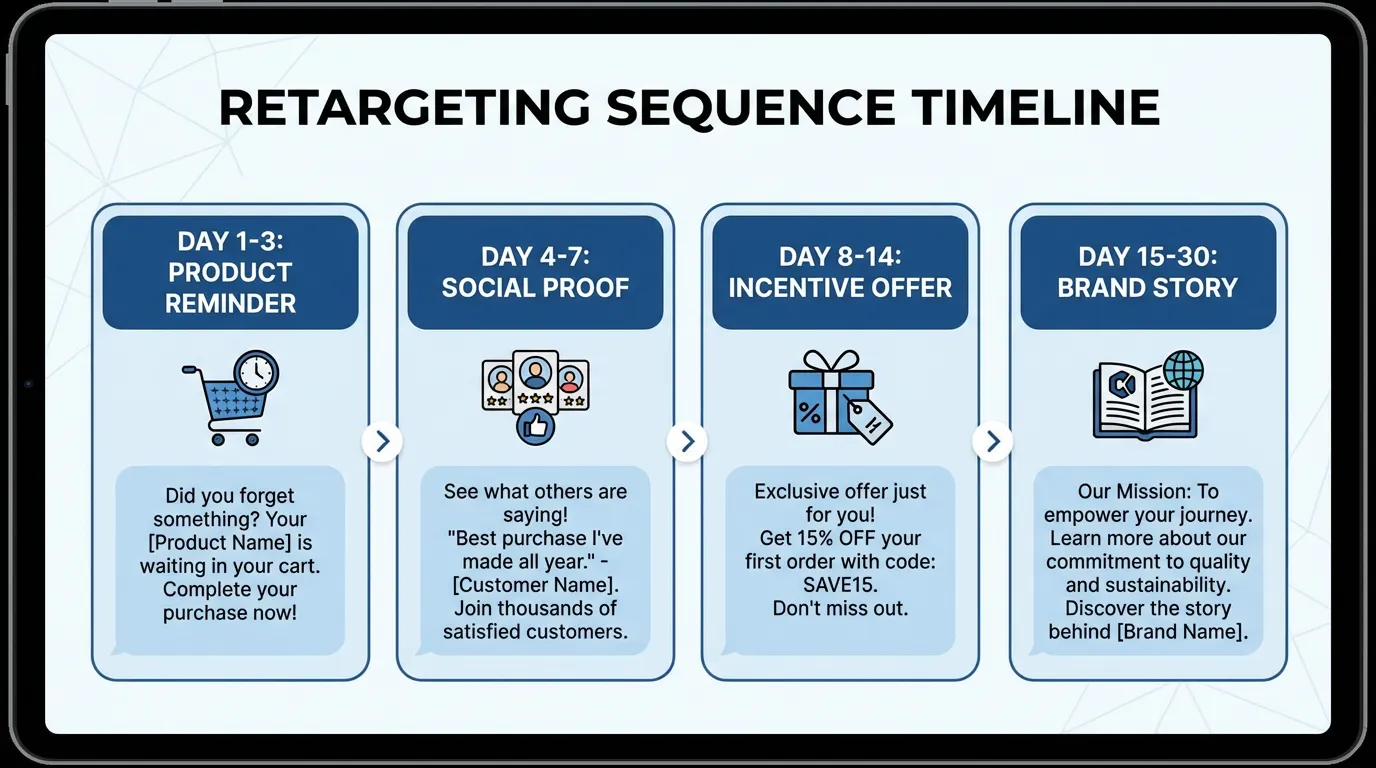
The Golden Timing Window
Why Timing Matters
:::tip Optimal Timing The golden window for reconnecting with visitors is within the first 24-48 hours after they leave your site. Their interest is still warm and your brand remains fresh. :::
Timing Strategy:
| Window | Priority | Frequency | Messaging |
|---|---|---|---|
| 0-3 hours | Highest | Immediate | "Still looking?" |
| 3-24 hours | Very High | Multiple | Value reminder |
| 1-3 days | High | Daily | Social proof |
| 3-7 days | Medium | Every 2 days | New angle |
| 7+ days | Lower | 2x week | Re-engage |
Cart Abandonment Retargeting
The Opportunity
:::highlight Recovery Potential With abandonment rates hovering around 70% (Baymard Institute), cart abandonment retargeting is essential for recovering revenue. Expect to recover 5-15% of abandoned carts, with some campaigns reducing abandonment by up to 26%. :::
Cart Abandonment Strategy
Ad Creative Elements:
- Show exact products abandoned
- Display current price
- Include urgency ("Still in your cart")
- Add social proof
- Offer assistance ("Questions? We're here")
Sequencing:
- Hour 1-3: Reminder (no discount)
- Hour 24: Value proposition + reviews
- Day 3: Small incentive (free shipping)
- Day 7: Larger incentive (10% off)
Incentive Strategy
:::warning Don't Train Abandonment Be careful with discounts. If users learn they get 10% off by abandoning, they'll always abandon. Reserve discounts for second or third touch. :::
Better Than Discounts:
- Free shipping
- Extended returns
- Bonus gift
- Express shipping upgrade
Social Proof in Retargeting
Why It Works
:::info Trust Factor Studies show 79% of consumers trust online reviews as much as personal recommendations. Social proof reduces perceived risk for hesitant buyers. :::
Social Proof Types:
- Star ratings and review counts
- Customer testimonials (video preferred)
- "X people bought this today"
- Media logos and press mentions
- Industry certifications
Implementation
In Ad Creative:
- Include review stars in images
- Quote brief testimonials
- Show purchase counts
On Landing Pages:
- Testimonial carousels
- Case study highlights
- Trust badges
Video Retargeting
The Performance Edge
:::highlight Video Advantage Online video will comprise 82% of all internet traffic by end of 2025. A retargeted video ad has a 10x higher probability of getting clicked compared to classic display ads. :::
Video Retargeting Types:
- Product demo for browsers
- Customer testimonial for abandoners
- Behind-the-scenes for brand builders
- Comparison for consideration stage
Video Specs:
- 15-30 seconds optimal
- First 3 seconds = hook
- Subtitles mandatory
- Mobile-first format
Funnel-Based Measurement
Metrics by Stage
:::tip Measure Right Different retargeting campaigns require different success metrics. What's good for awareness isn't good for conversion. :::
Upper Funnel (Engagement Focus):
- View rate
- Video completion rate
- Click rate
- Time on site
Mid Funnel (Consideration Focus):
- Lead form starts
- Content downloads
- Email sign-ups
- Return visits
Bottom Funnel (Conversion Focus):
- Conversion rate
- ROAS
- CPA
- Revenue
ROAS Benchmarks
| Segment | Target ROAS |
|---|---|
| Cart abandoners | 8-10x+ |
| High-intent visitors | 5-8x |
| Category browsers | 3-5x |
| General visitors | 2-4x |
Privacy-Compliant Strategies
The New Reality
:::warning Privacy First The deprecation of third-party cookies and stricter privacy laws require a more thoughtful approach. User consent isn't just legal compliance — it builds trust. :::
First-Party Data Focus
Collection Methods:
- Email capture (with consent)
- Account creation incentives
- Quiz/survey tools
- Loyalty programs
Activation:
- Customer match audiences
- CRM integrations
- Server-side tracking
- First-party cookies
Consent Best Practices
- Clear cookie banners with real choices
- Explain data usage transparently
- Respect opt-out requests immediately
- Build value exchange for data sharing
Incrementality Testing
Why It Matters
:::danger Attribution Truth In 2026, testing for incrementality is a must. It clarifies whether retargeting actually drives new conversions or just grabs credit. That distinction directly impacts real ROAS. :::
Test Structure
Holdout Test:
- Split retargeting audience randomly
- 90% sees ads (test group)
- 10% sees no ads (control group)
- Compare conversion rates
- Calculate true incremental lift
Expected Findings:
- Some lift is real
- Some is attribution capture
- True ROAS is lower than reported
- Still profitable if managed well
Account-Based Retargeting (B2B)
The Approach
For B2B, retarget entire buying committees, not just individuals:
Implementation:
- Define target account list
- Install tracking across web properties
- Identify engaged accounts
- Retarget decision-makers at those companies
- Coordinate with sales outreach
Messaging:
- Industry-specific content
- Role-specific value props
- Account-personalized creative (for top targets)
Why Does Intent-Based Segmentation Beat One-Size-Fits-All?
Treating every past visitor as a single audience flattens very different signals into one message, which suppresses relevance and inflates frequency. Marketing teams consistently report that segmented retargeting outperforms blanket retargeting on both efficiency and conversion quality, because the ad finally reflects where the person actually is in their decision.
Think about the gap between two visitors. One read a single blog post and left in eight seconds. The other added two items to a cart and abandoned at the shipping step. Showing both the same "Come back, 10% off" ad wastes the discount on someone who was never close and underwhelms someone who needed a small nudge. Intent-based segmentation fixes this mismatch.
The real cost of one-size-fits-all retargeting is not wasted spend alone. It is brand erosion. When low-intent users see the same aggressive ad dozens of times, they associate your brand with nagging. Segmentation protects the asset you spend years building: how people feel when they see your name.
You can go deeper on lifecycle approaches in our retargeting and remarketing strategies breakdown, which covers how these segments map to longer customer journeys.
How Should You Segment Audiences by Engagement Depth?
Engagement depth is the clearest proxy for purchase intent, so it should anchor your audience structure. Most performance teams build at least four tiers, then assign each tier its own message and frequency. The principle is simple: the deeper the engagement, the more direct the ask and the more frequency you can justify.
Browsers (visited, bounced fast)
These visitors barely engaged, so push education and brand story, not hard offers. Keep frequency low. A discount here is premature and trains people to expect markdowns. Use this tier to build familiarity, then let warmer behavior promote them into a higher-intent segment.
Shoppers (viewed products, no cart)
Shoppers signaled real interest but hesitated. Lead with product benefits, comparisons, and social proof such as reviews or usage proof. Frequency can sit at a moderate level. Your job is to resolve the specific doubt that stopped them, whether that is fit, price, or trust.
Cart abandoners (added, did not buy)
This is your highest-intent retargeting segment, so it earns the most direct messaging and a higher frequency ceiling. Address friction directly: shipping cost, checkout complexity, or a final hesitation. A time-bound incentive often works here because the intent is already strong and you are removing the last barrier.
Purchasers (already bought)
Existing customers should rarely see acquisition ads for what they own. Move them into upsell, cross-sell, and replenishment audiences. Keep frequency low and the tone appreciative. Suppressing recent buyers from your prospecting and cart campaigns alone usually tightens spend efficiency.
In our experience auditing accounts, the single most common leak is forgetting to exclude recent purchasers. Advertisers keep paying to re-sell something the customer already owns, and the wasted impressions hide inside an otherwise "fine" return number.
How Does Recency Change Your Bidding and Message?
Recency is the second lever, and it should reshape both bids and creative within every segment. Intent decays over time, so a visitor from this morning deserves more aggressive bidding than one from three weeks ago. Splitting each audience by recency window prevents you from overpaying for cold traffic and underbidding on hot leads.
A practical structure looks like this. The freshest window, roughly the first few days, is where intent and urgency are highest, so bid up and lead with the specific products viewed. The middle window carries moderate intent and rewards social proof and reassurance. As you stretch past a few weeks, intent fades toward prospecting, so shift to brand-level messaging and lighter spend rather than direct-response pressure.
Recency and engagement depth are not competing models; they are axes on the same grid. A cart abandoner from yesterday and a cart abandoner from 25 days ago belong to the same depth tier but deserve completely different treatment. The advertisers who win build a small matrix of depth times recency, not a flat list.
For tightening the on-site experience these audiences return to, pair this with our conversion rate optimization guide so the landing page resolves the same hesitation your ad addresses.
How Do You Retarget in a Privacy-First World?
Privacy changes have moved retargeting away from third-party cookies toward first-party data and platform-native signals. As browsers and operating systems restrict cross-site tracking, the audiences you own directly become the durable foundation. Advertisers that invested early in first-party collection have absorbed these shifts far more smoothly than those still leaning on legacy pixels.
Three priorities matter most. First, build first-party data through logged-in experiences, email capture, and consented on-site behavior, then activate it through customer match features. Second, adopt durable measurement so you can still attribute conversions as client-side signal weakens. Third, lean on platform-level modeled audiences where direct tracking is limited.
Get the data layer right with our first-party data advertising strategy, and shore up measurement with the server-side tracking and attribution guide. Together they keep your segments populated and your reporting trustworthy.
Across the accounts we review, the pattern is consistent: advertisers with a maintained first-party audience source restore retargeting reach quickly after tracking disruptions, while those relying purely on pixel-based audiences see retargeting pools shrink and stay small.
Conclusion
Retargeting remains one of the most effective digital advertising strategies in 2026. The key is treating it as a sophisticated nurturing system rather than just "showing ads to past visitors."
Success requires thoughtful segmentation, relevant creative, proper frequency management, and continuous optimization. With the right strategy, retargeting can become your highest-performing channel.
Ready to automate your retargeting? Explore AdBid's media buying AI →