
Facebook & Meta Ad and Post Size Guide 2026: All Image and Video Dimensions
Wrong dimensions remain one of the quietest killers of ad performance. Meta processes the majority of its impressions on mobile devices, where a mis-sized creative gets cropped, stretched, or downscaled before a single person sees it. According to Meta's own advertiser guidance, vertical and square formats consistently win more screen real estate than landscape on phones. This guide pulls together the current 2026 specs for every major Facebook, Instagram, and Messenger placement, plus practical rules for file size, safe zones, and exporting once for many placements.
Key Takeaways
- Default to 1080 x 1080px (1:1) for Feed and 1080 x 1920px (9:16) for Stories and Reels.
- Keep image files under 30MB and videos under 4GB, per Meta Business Help guidance.
- Most Meta impressions are served on mobile, so design vertical-first.
- The strict 20% text rule is gone, but low-text creatives still tend to perform better.
- Build one master file at the largest size, then export square and landscape variants.
Why Do Image Dimensions Still Matter in 2026?
Dimensions matter because Meta auto-crops and compresses every upload to fit each placement, and a poor source file has nowhere to hide. Meta Business Help recommends uploading the highest-resolution asset available so the platform downscales rather than upscales. When you ignore this, you pay for impressions that look pixelated, awkwardly cropped, or off-brand.
The cost shows up in three places. First, engagement drops when a face or headline gets sliced by an aspect-ratio mismatch. Second, perceived quality falls on high-DPI phone screens, where a 600px image looks soft. Third, you waste budget delivering creatives that never had a fair chance to convert.
Here's the practical takeaway. Pick the placement first, then design to its native ratio. A 16:9 graphic forced into a 1:1 Feed slot loses roughly a third of its visible area. If your campaigns aren't converting despite solid targeting, creative formatting is worth auditing before you blame the algorithm. Our breakdown of why Facebook ads stop converting covers the diagnostic order in detail.
What Are the Correct Facebook Feed Sizes?
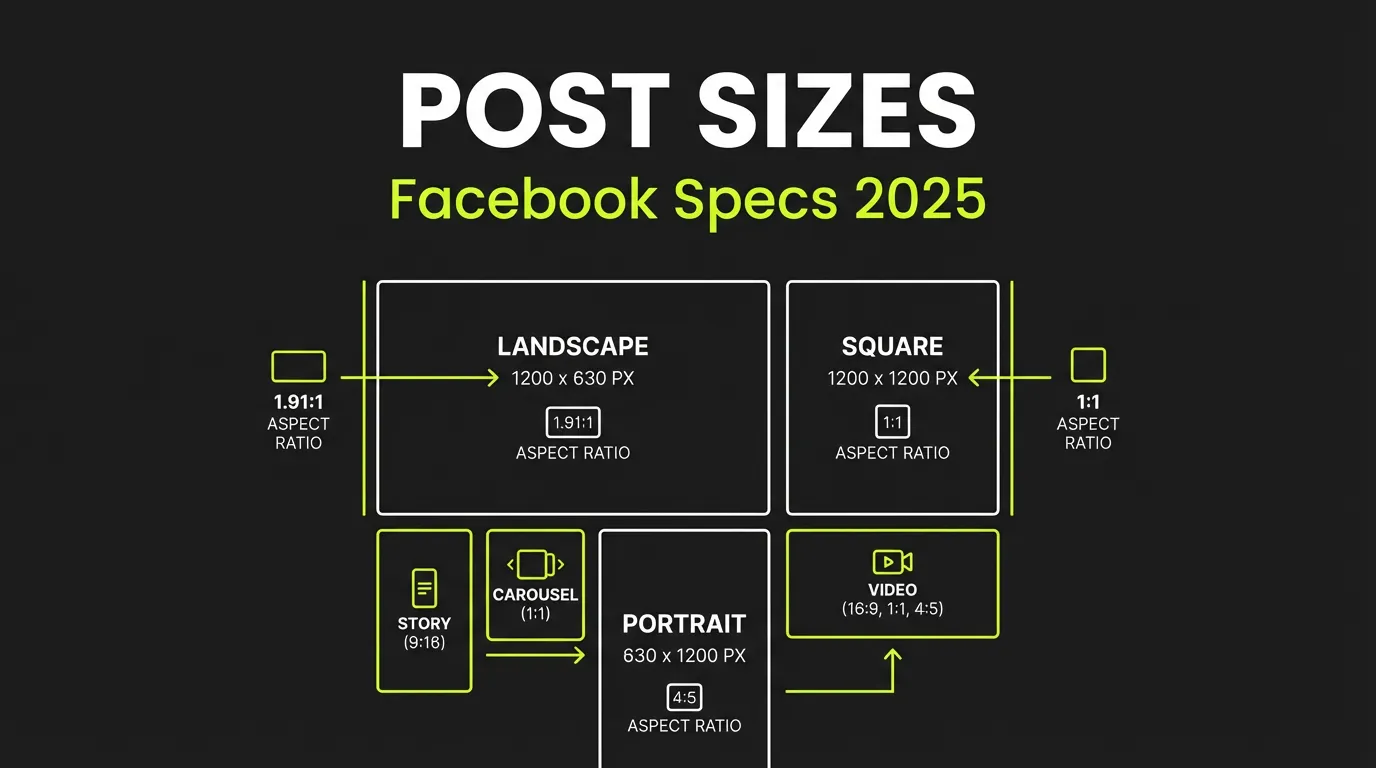
Facebook Feed accepts square, vertical, and landscape creatives, but square (1:1) and vertical (4:5) take up the most space on mobile, where the bulk of Meta's impressions are delivered. For most advertisers, 1080 x 1080px is the safe default, with 1080 x 1350px as a strong vertical alternative for organic posts and ads alike.
Feed Image and Video
| Spec | Recommendation |
|---|---|
| Square resolution | 1080 x 1080px (1:1) |
| Vertical resolution | 1080 x 1350px (4:5) |
| Landscape resolution | 1200 x 628px (1.91:1) |
| Image file type | JPG or PNG |
| Max image size | 30MB |
| Video ratio | 1:1, 4:5, or 16:9 |
| Max video size | 4GB |
The 4:5 vertical format earns extra vertical pixels on phones without triggering the cropping that taller ratios face in Feed. For video, vertical and square clips with burned-in captions tend to hold attention longer, since a large share of feed video plays without sound.
Carousel Ads
Carousel cards must share one consistent ratio across the set, and 1:1 at 1080 x 1080px is the reliable choice. You can include 2 to 10 cards mixing images and video. Keep the first card strong, because it carries most of the click-through weight.
What Sizes Do Facebook Stories and Reels Use?
Stories and Reels are full-screen vertical placements that require a 9:16 ratio at 1080 x 1920px. Because Meta overlays profile details, captions, and buttons on top of the creative, the platform recommends keeping key elements inside a safe zone away from the top and bottom edges.
| Placement | Resolution | Ratio | Notes |
|---|---|---|---|
| Stories image | 1080 x 1920px | 9:16 | Keep logos and text centered |
| Stories video | 1080 x 1920px | 9:16 | Short clips work best |
| Reels | 1080 x 1920px | 9:16 | Add captions for sound-off viewing |
A reliable working rule is to keep important text and logos roughly 250px from the top and 340px from the bottom, so UI elements never cover your message. Reels reward motion and a hook in the first second. If you want more reach on the organic side before paying to amplify, our guide to boosting a Facebook post walks through when promotion actually pays off.
What Are the Specs for Other Meta Placements?
Beyond Feed and Stories, Meta runs ads across Marketplace, Messenger, Search results, and the Audience Network, and each leans on a small set of familiar ratios. The two workhorses are 1:1 (1080 x 1080px) and 1.91:1 (1200 x 628px), so building those two masters covers most of the catalog.
Quick Reference Across Placements
| Placement | Size (px) | Ratio |
|---|---|---|
| Feed (square) | 1080 x 1080 | 1:1 |
| Feed (vertical) | 1080 x 1350 | 4:5 |
| Feed (landscape) | 1200 x 628 | 1.91:1 |
| Stories / Reels | 1080 x 1920 | 9:16 |
| Carousel | 1080 x 1080 | 1:1 |
| Right column (desktop) | 1200 x 628 | 1.91:1 |
| Marketplace | 1200 x 1200 | 1:1 |
| Search results | 1080 x 1080 | 1:1 |
| Messenger inbox | 1200 x 628 | 1.91:1 |
| Audience Network native | 1200 x 628 | 1.91:1 |
Instagram via Meta Ads Manager
Instagram placements run through the same Ads Manager and share Facebook's ratios. Use 1080 x 1080px for square Feed, 1080 x 1350px for vertical Feed, and 1080 x 1920px for Stories and Reels. Treating Instagram as a separate spec sheet is usually unnecessary once you have the core ratios exported.
How Should You Handle Text, Video, and File Optimization?
Meta removed the hard 20% text limit years ago, yet its guidance still favors clean, low-text creatives that read instantly on a small screen. The same principle applies to video, where audio-off viewing is the norm and on-screen captions carry the message.
Text Overlay
Keep copy short, high-contrast, and large enough to read at thumbnail size. Strong creative usually leads with a single idea, not a paragraph. If your headlines feel weak, the ad copywriting guide covers hooks that survive a fast scroll, and the creative strategy framework explains how to plan variations before you open a design tool.
Recommended Video Settings
Container: MP4 or MOV
Codec: H.264
Audio: AAC, 128kbps or higher
Frame rate: 30fps or 60fps
Bitrate: roughly 8-12 Mbps for 1080p
Optimization Checklist
For images, export at 2x and let Meta downscale, use PNG for flat graphics, and use JPG near 85% quality for photos. For video, master at high quality first, then compress to the 8-12 Mbps range for 1080p and confirm the file stays under 4GB. Always add captions, since a large share of feed video is watched on mute.
What Are the Most Common Sizing Mistakes?
The most frequent mistakes trace back to designing for one placement and shipping it everywhere. Mismatched aspect ratios cause cropping, low source resolution looks soft on modern phones, and edge-placed logos vanish under Stories UI. Each one quietly erodes the budget you already committed.
Five recurring errors are worth a final scan before you publish. Wrong aspect ratio for the placement. Resolution below the recommended minimum. Important elements pushed to the edges where cropping happens. Ignored safe zones in Stories and Reels. And text so dense it competes with the message instead of supporting it. A two-minute review against this list saves far more than it costs.
How Do You Export Once for Many Placements?
The efficient workflow is to build a single master creative at the largest vertical size, then derive the smaller ratios from it. Starting at 1080 x 1920px gives you the most pixels to crop down from, which avoids the quality loss that comes from scaling a small file up.
A clean four-step sequence works for most teams. Design the 9:16 Stories master first. Adapt it to 1:1 square for Feed and Carousel. Create the 1.91:1 landscape version for right column and Messenger. Then export every variant and check each against its safe zone. Tools like Canva, Figma, Adobe Express, and Photoshop all support this multi-size export, and AI creative tools can now generate a full placement set from one prompt.
Frequently Asked Questions
What is the best Facebook ad image size in 2026?
For most campaigns, 1080 x 1080px (1:1) is the safest default because it displays cleanly across Feed, Marketplace, and Search. For mobile-heavy reach, 1080 x 1350px (4:5) earns more vertical screen space. Meta Business Help recommends uploading the highest available resolution so the platform downscales rather than upscales.
Does Facebook still enforce the 20% text rule?
No, Meta removed the strict 20% text overlay rule that once limited reach. However, its current guidance still favors low-text creatives, and clean visuals with short, high-contrast copy generally perform better than text-heavy images, especially at thumbnail size on mobile feeds.
What size should Facebook and Instagram Reels be?
Reels use a full-screen 9:16 vertical format at 1080 x 1920px on both Facebook and Instagram through Meta Ads Manager. Keep logos and key text inside a safe zone, roughly 250px from the top and 340px from the bottom, so the platform's buttons and captions never cover your message.
Can I use the same creative for Facebook and Instagram?
Yes, because both run through Meta Ads Manager and share the same core ratios. A 1:1 or 4:5 file works for Feed on both platforms, and a 9:16 file covers Stories and Reels everywhere. Building those ratios once lets you cover the majority of Meta placements without redesigning per app.
Final Word
Correct dimensions are the cheapest performance lever you control. Design vertical-first, keep files within Meta's size limits, respect Stories safe zones, and master one large creative you can crop into every ratio. Most impressions happen on mobile, so a square or vertical asset will almost always serve you better than a landscape one. Pair clean sizing with strong hooks and a tested creative plan, and your budget finally reaches people the way you intended.
Want every placement size generated automatically from a single brief? Let AdBid's AI Agents Ads Manager build a full set of correctly-sized Meta creatives, or open your dashboard to launch your next campaign.