
Part of our Meta Ads Platform guide series.
The Frustration Is Real
:::info Sound Familiar? You've built what looks like a solid campaign. The creative is sharp. The targeting makes sense. You hit publish and... nothing. Impressions are flowing, maybe some clicks, but conversions are nowhere. :::
I've been there. I've also diagnosed hundreds of accounts with the same problem. The causes fall into predictable patterns, and almost all of them are fixable.
Teams running this at volume lean on AdBid's campaign automation to plan, launch, and optimize without tool-switching.
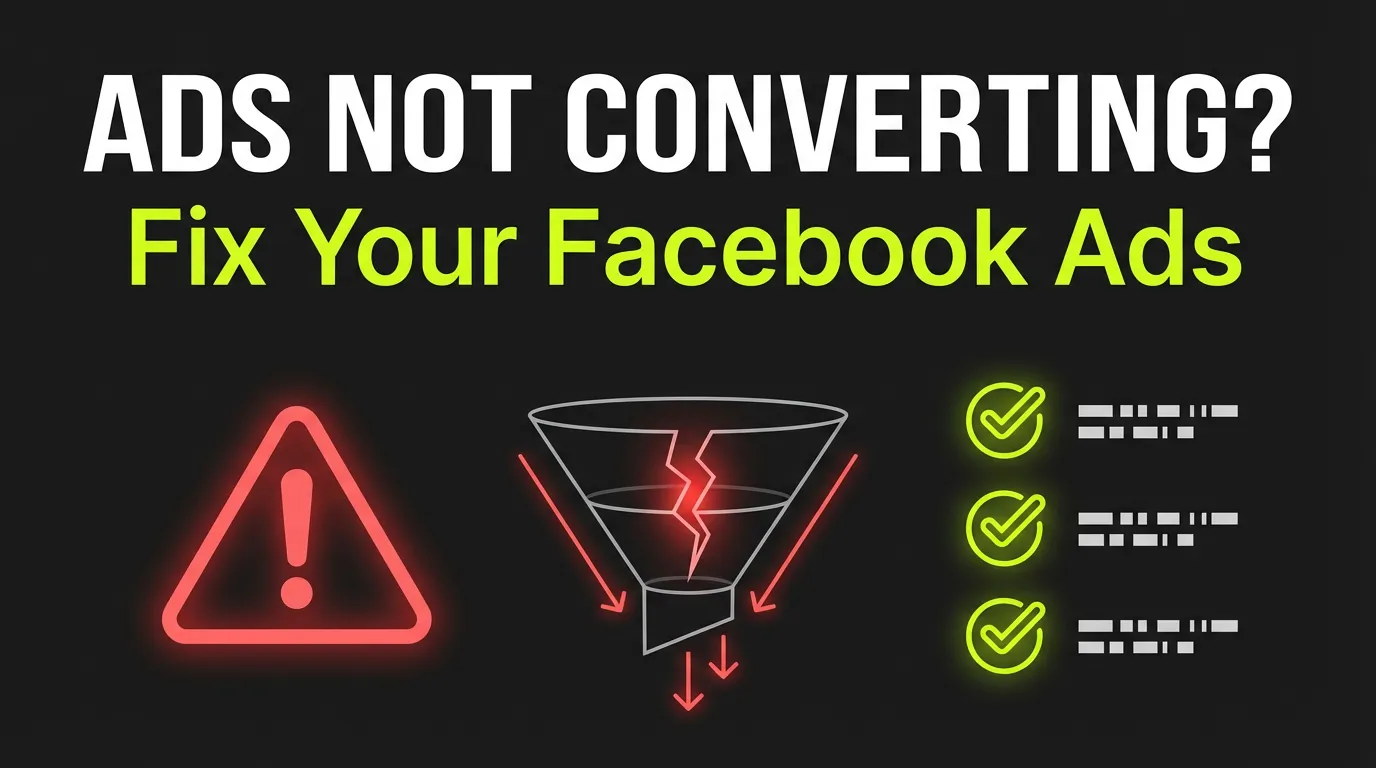
Let me walk you through the 11 reasons I see most often — and exactly what to do about each one.
First: Understand What You're Actually Measuring
Before diving into fixes, make sure you're measuring the right things:
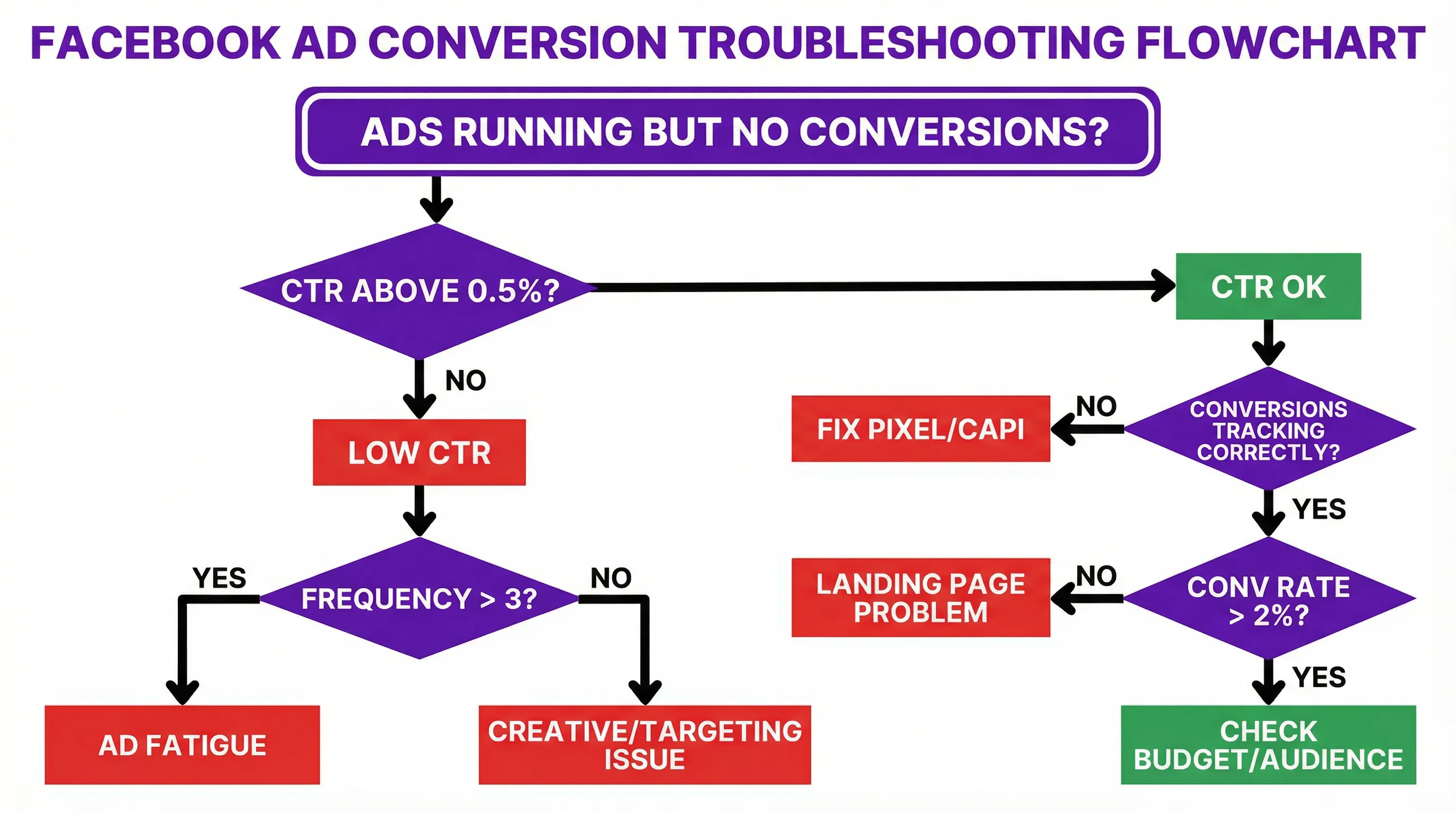
Click-Through Rate (CTR): Are people interested enough to click? Industry average is around 0.9%. Below 0.5% usually means creative or targeting issues.
Conversion Rate: Of those who clicked, what percentage converted? This reveals landing page effectiveness.
Cost Per Conversion: What are you actually paying for results?
:::highlight Diagnostic Framework
- High CTR, Low Conversions → Landing page problem
- Low CTR, Low Conversions → Creative or targeting problem
- Decent metrics but low volume → Budget or audience size problem
- Metrics were good, now declining → Fatigue or competitive pressure :::
Now let's dig into each cause.
Reason #1: Your Meta Pixel Is Broken
:::warning #1 Technical Cause This is the most common technical issue, and it's often invisible to advertisers who don't know where to look. :::
Symptoms:
- Conversions happening on your site but not showing in Ads Manager
- Large discrepancies between Analytics and Meta data
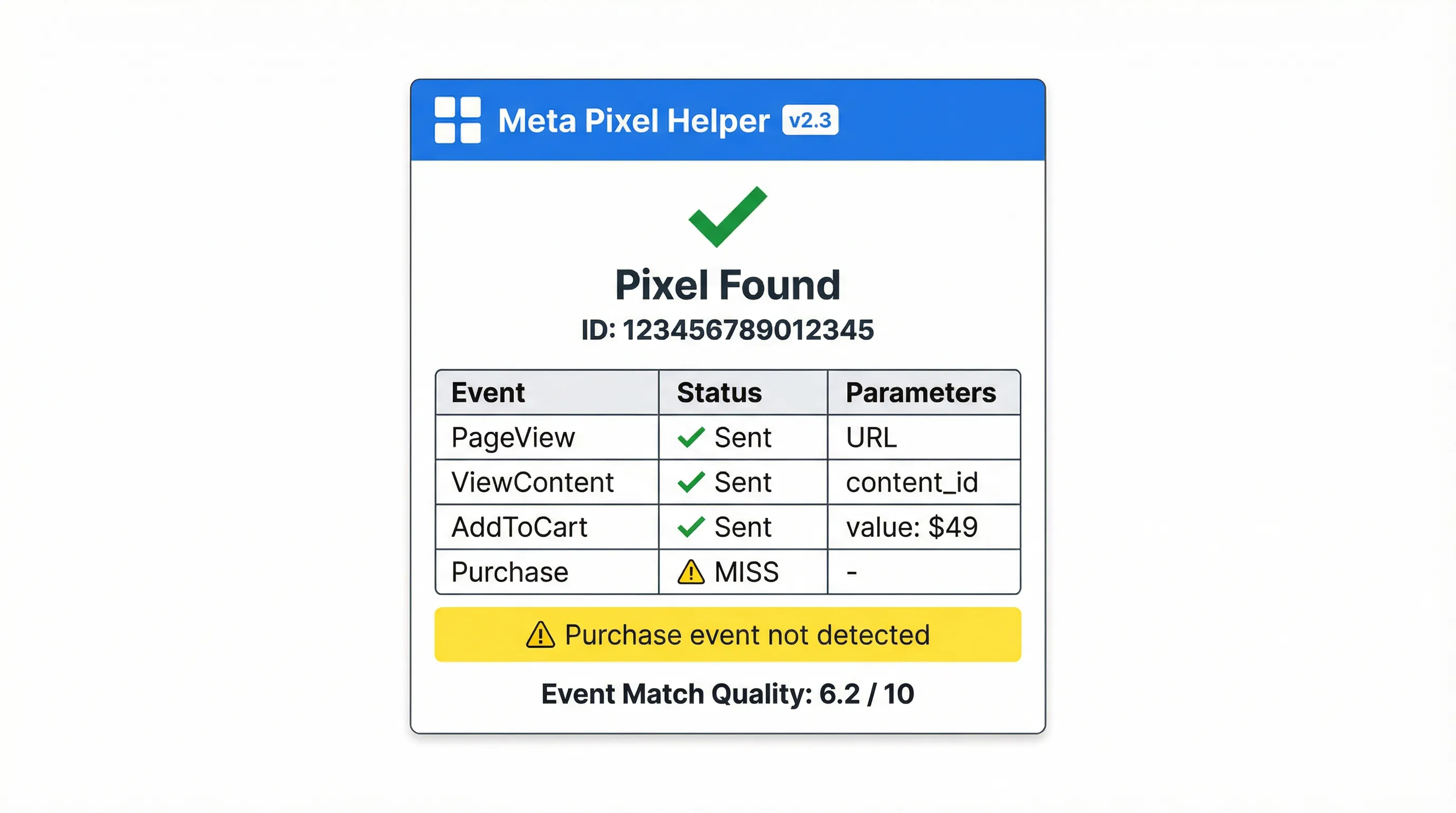
- Event Match Quality below 5.0
:::info Common Pixel Problems
- Pixel installed on some pages but not all (especially thank-you pages)
- Duplicate pixels firing and confusing the data
- Pixel code placed in wrong location (should be in head tag)
- Outdated pixel code from years-old installation
- Cross-domain tracking failures for multi-domain funnels :::
How to Diagnose:
- Install Meta Pixel Helper browser extension
- Navigate through your entire conversion funnel
- Check Events Manager for real-time event testing
- Verify Event Match Quality score
How to Fix:
- Reinstall pixel fresh using Meta's current code
- Implement Conversions API for server-side backup
- Test every step of your funnel with real conversions
- Set up test events to verify before going live
Reason #2: Your Creatives Don't Compel Action
Clicks don't equal conversions. Your ad might be interesting enough to click but not compelling enough to convert.
Signs of weak creative:
- Good impressions, low CTR (creative isn't stopping the scroll)
- Good CTR, low conversions (creative attracts wrong people)
- Comments asking "what is this?" or expressing confusion
Creative Fixes:
Copy improvements:
- Lead with benefits, not features
- Address specific pain points your audience has
- Create urgency without being gimmicky
- Make the CTA crystal clear
Visual improvements:
- First 3 seconds of video must hook (most watch is sound-off)
- High contrast colors that pop in feed
- Show the product/service in use, not just alone
- Test UGC-style against polished production
Strategic improvements:
- Match creative tone to landing page (continuity matters)
- Test multiple angles simultaneously
- Rotate fresh creative every 2-3 weeks minimum
Reason #3: Your Landing Page Fails the "Obvious Test"
Here's my rule: within 5 seconds of landing, a visitor should know exactly what you offer and what they should do next.
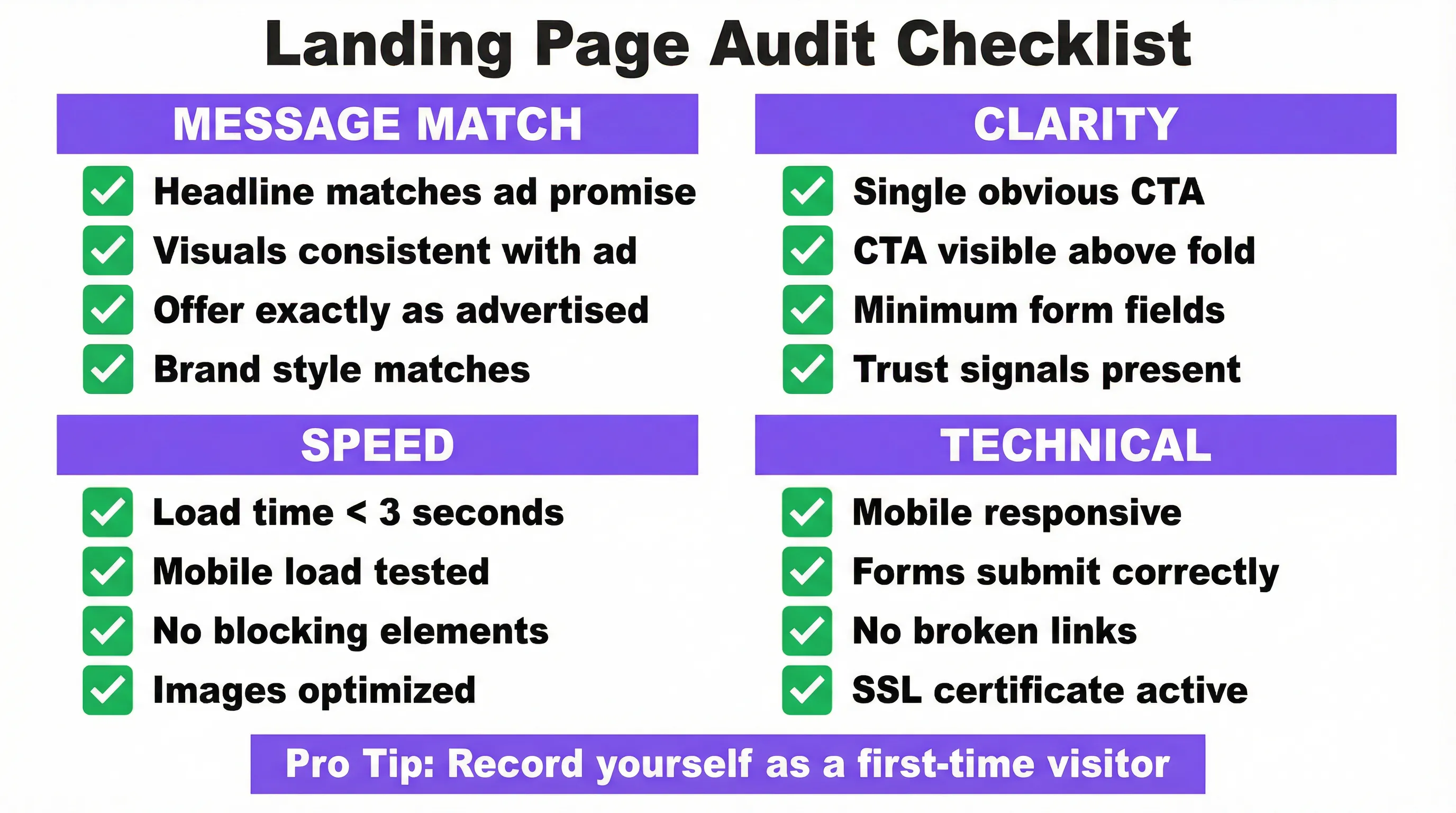
Landing Page Audit Checklist:
Message Match:
- Does the headline match what the ad promised?
- Are the visuals consistent with the ad?
- Is the offer exactly what was advertised?
Speed:
- Page load time under 3 seconds?
- Mobile load time specifically tested?
- No heavy elements blocking content?
Clarity:
- Obvious, single CTA visible without scrolling?
- Form has absolute minimum required fields?
- Trust signals present (reviews, security badges, logos)?
Technical:
- Mobile-responsive (not just "works on mobile")?
- Forms actually submit and redirect correctly?
- No broken links or missing images?
Pro tip: Record yourself landing on your page like a first-time visitor. Say out loud what you're seeing. If you hesitate or get confused, so will your visitors.
Reason #4: You're Targeting the Wrong Audience
Wrong audience = right ad shown to wrong people = no conversions.
Targeting Mistakes I See Constantly:
Too broad:
- "Everyone ages 18-65 who likes shopping" isn't targeting
- Broad works only with big budgets and good creative volume
Too narrow:
- 50,000 person audience can exhaust quickly
- Algorithm needs room to optimize
Wrong stage:
- Showing sales messages to cold audiences
- Showing awareness content to ready-to-buy audiences
Better Targeting Approaches:
- Custom Audiences: Website visitors, email lists, engagers
- Lookalikes: 1-2% of your best customers
- Broad with exclusions: Remove existing customers, recent purchasers
- Advantage+ Targeting: Let Meta's AI find converters (requires sufficient data)
Warning: Large targeting changes reset the learning phase. Make adjustments strategically, not reactively.
Reason #5: Ad Fatigue Has Set In
Your audience has seen your ad too many times. They've gone blind to it.
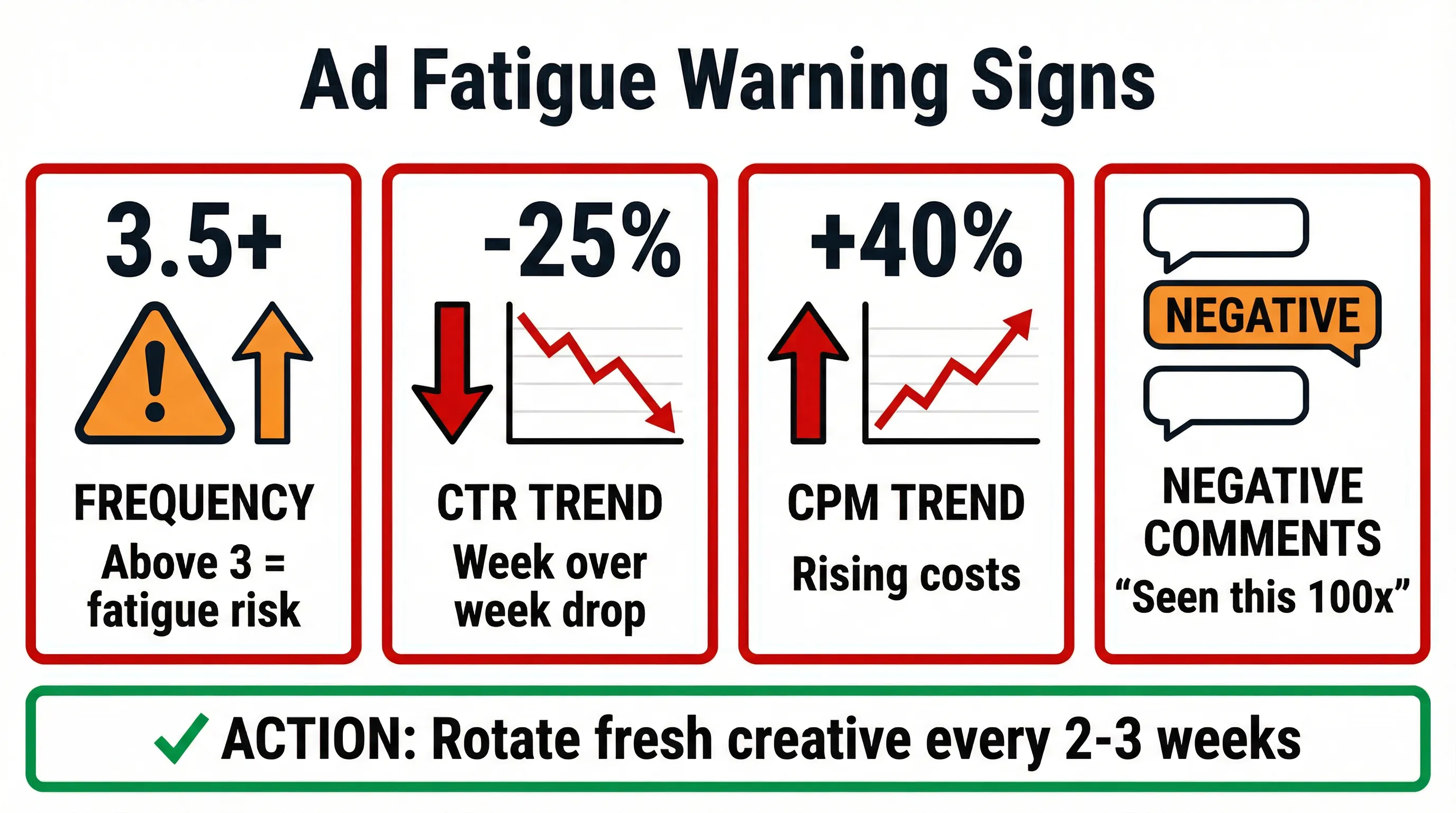
Key Fatigue Indicators:
- Frequency above 3 (prospecting) or 5 (retargeting)
- CTR declining week over week
- CPM rising without competitive pressure
- Negative comments increasing
Fatigue Solutions:
Immediate:
- Pause high-frequency creatives
- Exclude users who've already clicked/engaged
- Reduce budget to lower frequency
Systematic:
- Rotate in new creative every 2-3 weeks
- Use dayparting to reduce wasted impressions
- Create separate ad sets for different placements
- Build creative pipeline before you need it
Reason #6: Your Campaign Objective Is Wrong
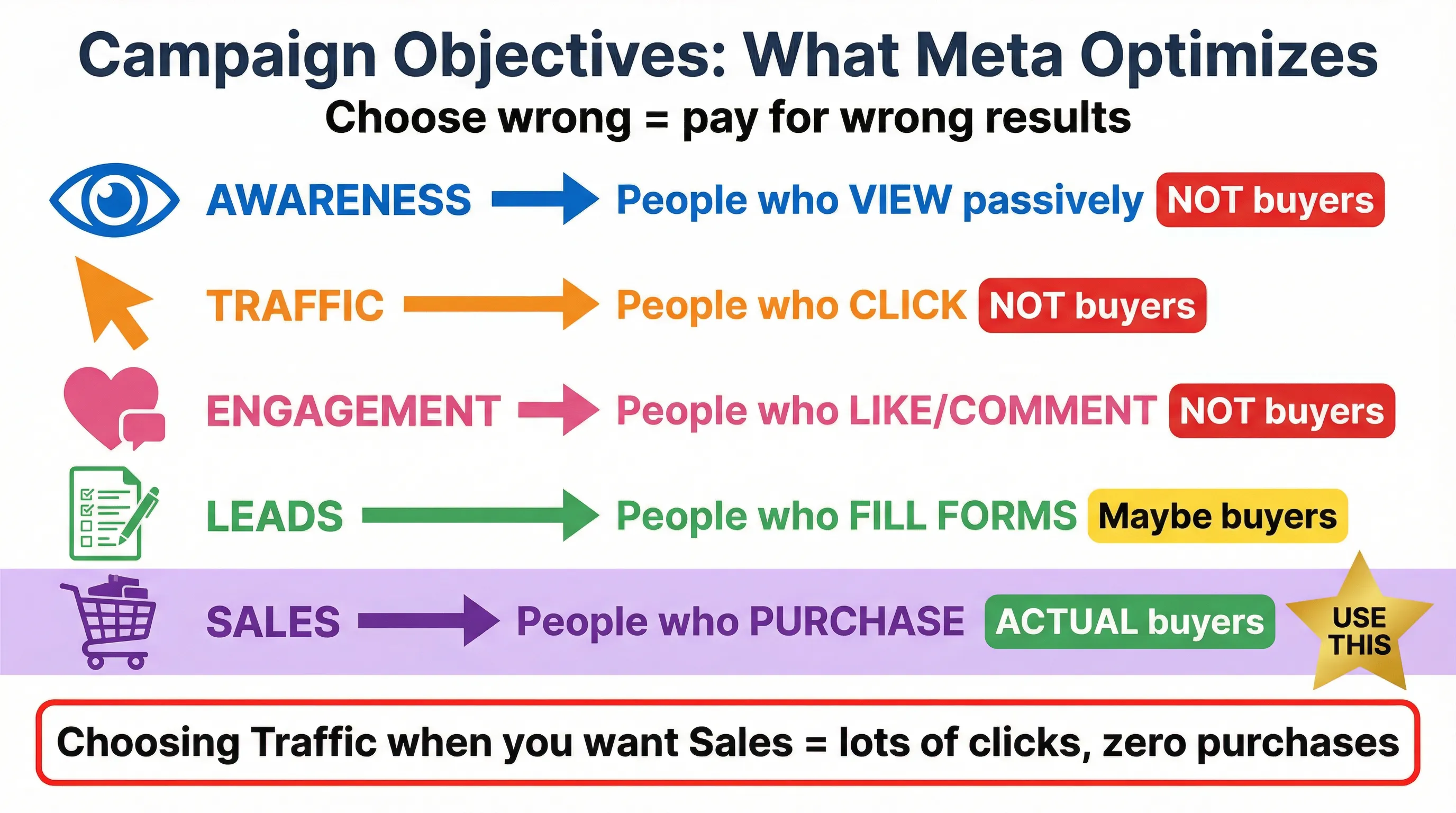
:::warning Biggest Budget Waster This one wastes more budget than any other mistake. Meta optimizes for exactly what you tell it to. :::
If you choose:
- Awareness: Meta shows to people who view passively (not buyers)
- Traffic: Meta shows to people who click (not necessarily buyers)
- Engagement: Meta shows to people who like/comment (not necessarily buyers)
- Leads: Meta shows to people who fill forms
- Sales: Meta shows to people who purchase
"Choosing Traffic or Engagement when you want Sales gives you lots of cheap clicks from people with zero purchase intent."
:::tip The Fix Use Sales objective if you want purchases. Use Leads objective if you want form fills. Pay for what you actually want. :::
Exception: Awareness can work for top-of-funnel campaigns feeding remarketing audiences. But measure downstream conversions, not awareness metrics.
Reason #7: Your Budget Is Too Low
This is uncomfortable to hear, but some accounts simply don't spend enough to give the algorithm data to optimize.
Budget Reality Check:
- Facebook needs ~50 optimization events per ad set per week (Meta Business Help)
- If your CPA is $50, you need $2,500/week PER AD SET
- Multiple ad sets multiply this requirement
If budget is constrained:
- Consolidate to fewer ad sets
- Use Campaign Budget Optimization (CBO)
- Focus on higher-intent audiences first
- Consider lead gen over purchases if tickets are high
The Math: If your target CPA is $100 and you're spending $20/day, you're getting one conversion every 5 days. That's not enough signal for optimization.
Reason #8: You're Stuck in Learning Phase
Facebook's learning phase requires ~50 conversions within 7 days to stabilize. Until then, performance fluctuates.
Stuck in Learning Symptoms:
- "Learning" status doesn't change after a week
- Performance swings wildly day to day
- CPA is 2-3x higher than target
How to Exit Learning Faster:
- Consolidate ad sets — fewer ad sets mean more conversions each
- Broaden audiences — larger pools reach threshold faster
- Don't edit constantly — edits reset learning
- Consider optimization events — optimizing for "add to cart" instead of "purchase" may exit faster (then layer in purchase optimization)
Important: Don't judge performance during learning. Wait until stabilized to make decisions.
Reason #9: Your Ad Is Under Review Too Long
Review delays cost you money and momentum. Some accounts get flagged for extended review repeatedly.
Why Reviews Take Forever:
- Content policy violations (even suspected)
- Sensitive topics (health, money, politics)
- Image/text misalignment with landing page
- Editing ads while under review (restarts the process)
- Account history of rejections
How to Speed Reviews:
- Follow policies meticulously from the start
- Don't edit during review
- Build a clean account history over time
- Use clear, compliant landing pages
- Avoid policy-edge products if possible
Reason #10: Your Ads Keep Getting Rejected
Rejections mean zero reach. Multiple rejections risk account restriction.
Most Common Rejection Triggers:
- Before/after imagery (especially health/fitness)
- Income claims or guarantees
- Personal attribute assumptions ("Are you overweight?")
- Misleading buttons or fake interface elements
- Prohibited products (even accidentally implied)
How to Avoid:
- Read Facebook Advertising Standards completely
- Use their policy checker before publishing
- Watch your language carefully
- Keep landing pages consistent with ads
If Rejected:
- Check Business Support Home for reason
- Appeal if you genuinely believe it's wrong
- Don't just resubmit the same ad
Reason #11: Your Feedback Score Is Tanking
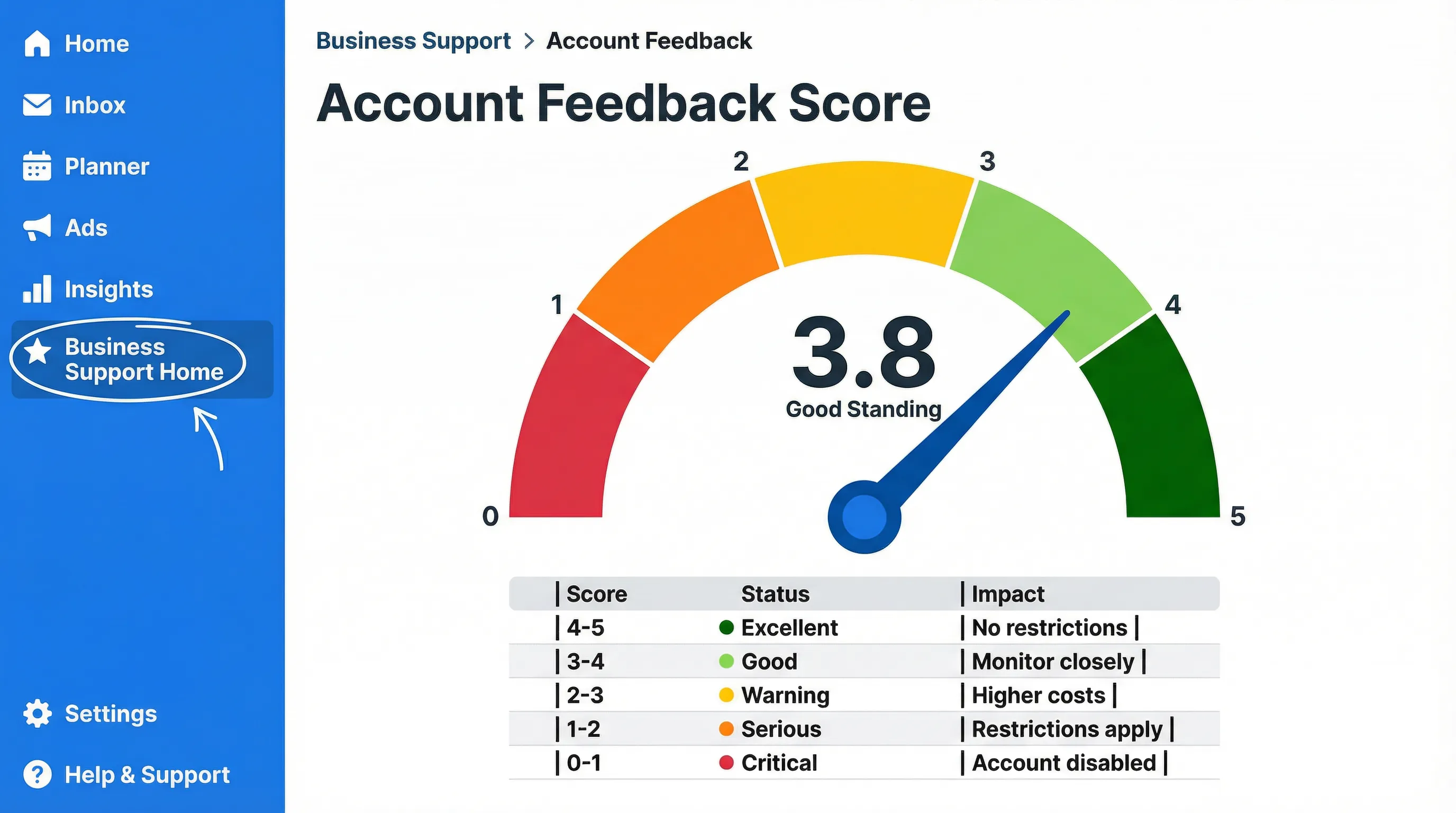
Low feedback scores increase costs and restrict delivery. Below 1.0, you can lose advertising access entirely.
Score Ranges:
- 4-5: Healthy
- 3-4: Watch closely
- 2-3: Warning issued, higher costs, reduced reach
- 1-2: Serious warning, significant restrictions
- Below 1: Account disabled
What Impacts Your Score:
- Delivery speed (late shipments kill scores)
- Product quality (returns and complaints)
- Customer service responsiveness
- Accuracy of product descriptions
- Refund policies and execution
How to Check: Business Support Home → Meta Business Accounts → Business Account feedback score
If Score Is Low:
- Address fulfillment issues immediately
- Improve customer service response times
- Ensure product descriptions are accurate
- Consider pausing ads until you fix operational issues
The Systematic Approach
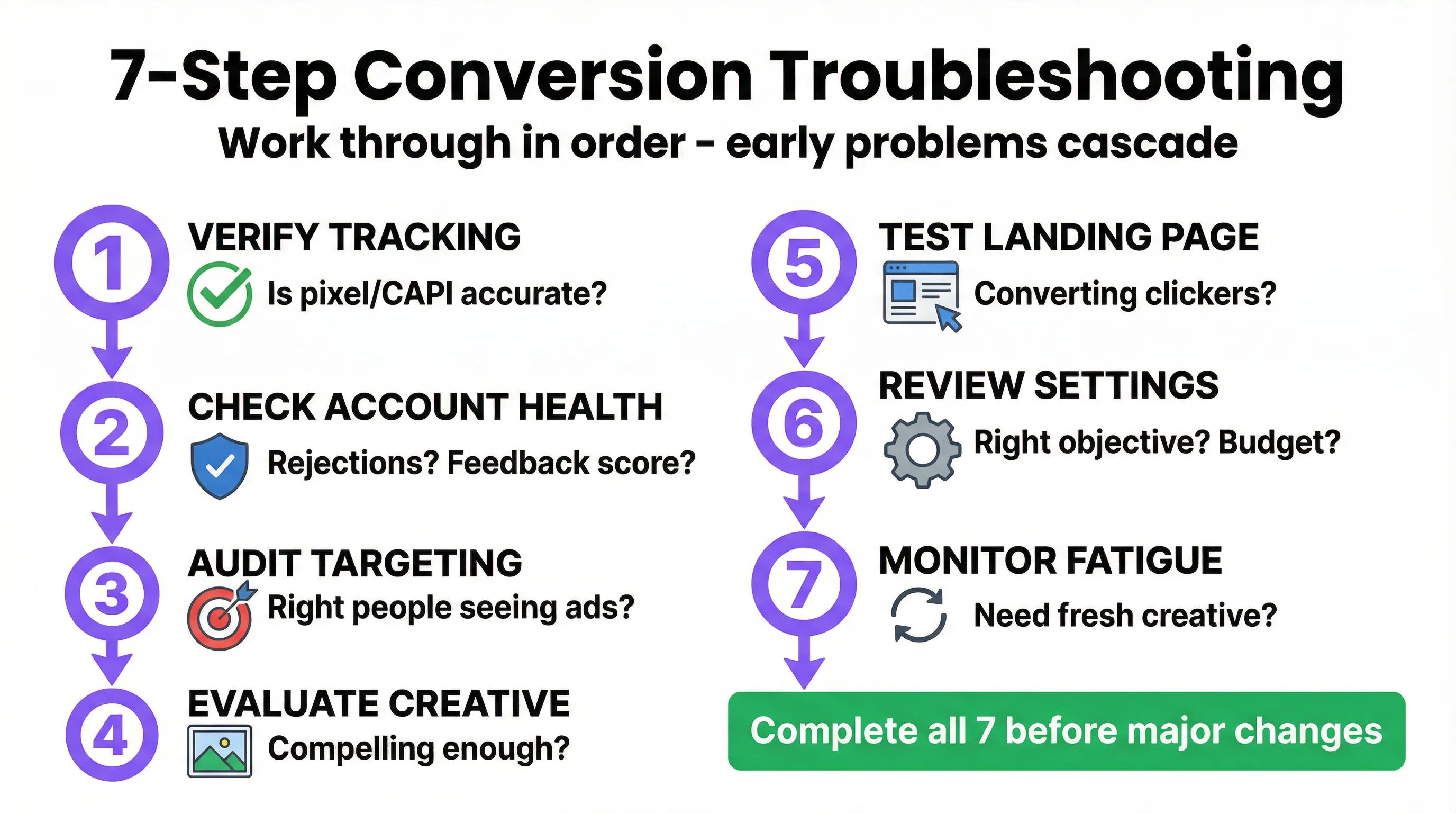
:::highlight Don't Troubleshoot Randomly Work through this diagnostic in order — earlier problems cascade into everything downstream. :::
- Verify tracking — Is data even accurate?
- Check account health — Rejections? Feedback score?
- Audit targeting — Right people seeing ads?
- Evaluate creative — Compelling enough?
- Test landing page — Converting those who click?
- Review settings — Right objective? Sufficient budget?
- Monitor fatigue — Need fresh creative?
Tired of diagnosing conversion problems manually? AdBid monitors your campaign health automatically and alerts you to issues before they tank performance. Try AdBid free for 14 days.