
Dynamic Creative Optimization in 2026: The AI-Native Playbook
Dynamic Creative Optimization (DCO) assembles and personalizes ad creative in real time, matching the right images, copy, and offers to each viewer and context. In 2026, the practice has shifted from rule-based assembly toward AI-native systems that generate variants on demand. According to the IAB's 2024 Digital Video Ad Spend report, advertisers continue moving budget toward formats that support data-driven personalization at scale.
This guide focuses on what changed recently: generative creative production, privacy-first signals, and the operational habits that keep DCO programs healthy. If you want the foundational walkthrough of feeds, rules, and platform setup, start with the 2025 DCO guide and use this article for the newer layer on top.
Key Takeaways
- DCO in 2026 leans on generative AI to produce creative variants, not just swap pre-built modules.
- Privacy changes have pushed personalization toward contextual and first-party signals instead of granular tracking.
- Meta reports that businesses using its Advantage+ creative tools saw measurable performance gains versus manual setups (Meta for Business, 2023).
- Strong product data and disciplined refresh cycles still decide whether DCO works.
What Has Changed in DCO Since 2025?
The biggest shift is generation, not assembly. Older DCO assembled finished modules into combinations; 2026 systems can produce new headlines, backgrounds, and layouts from a brief. Google's 2023 launch of generative AI tools inside its ad products signaled this direction, letting advertisers create assets directly within campaign workflows (Google Ads & Commerce Blog, 2023).
This matters because the old bottleneck was supply. Teams could define rules faster than designers could build modules. Generative production loosens that constraint, so a campaign can test dozens of distinct concepts rather than recombining the same handful of assets.
There is a trade-off, though. More machine-generated variants raise the risk of off-brand or repetitive output. The discipline that used to govern asset libraries now has to govern generation prompts and brand guardrails. For a structured approach to that planning layer, see our creative strategy framework.
Generative Variants vs Module Swapping
Module swapping picks from fixed parts: headline A, image B, CTA C. Generative DCO can write a fresh headline tuned to a segment or render a new background for a season. The first approach is predictable and easy to audit. The second is broader and faster but needs tighter review.
Most mature programs in 2026 blend both. They lock brand-critical elements as fixed modules and let generation handle the high-variance pieces like seasonal copy or audience-specific hooks.
How Does Privacy Change DCO Personalization?
Signal loss has reshaped how DCO targets and personalizes. With third-party cookies deprecated and mobile identifiers restricted, many programs lean on contextual signals and first-party data instead of granular cross-site profiles. The IAB has documented this industry-wide move toward privacy-resilient measurement and addressability (IAB, 2023).
Practically, this means weather, location, time of day, page context, and your own CRM segments now carry more weight than they did a few years ago. These signals are durable because they do not depend on tracking a user across the open web.
First-party data becomes the engine. A retailer's purchase history, loyalty tier, or browsing session on its own site can power personalization without third-party identifiers. The teams that invested early in clean, consented first-party data have a real advantage in 2026.
Contextual and First-Party Signal Examples
- Page or app context the ad appears in
- Local weather and time of day
- Approximate geography for store or inventory relevance
- First-party segments: cart status, purchase recency, loyalty tier
- Session behavior on owned properties
Each of these works without persistent cross-site tracking, which is why they have grown more central to DCO strategy.
Which DCO Use Cases Deliver in 2026?
Retargeting and catalog ads remain the highest-confidence use cases, because they rely on first-party and product data rather than open-web tracking. Meta's dynamic ads, for example, pull from a product catalog to show relevant items, and the company reports performance gains from its automated creative tools (Meta for Business, 2023).
Beyond retargeting, three patterns stand out this year.
Sequential Storytelling
Instead of one message, DCO walks a prospect through a sequence: awareness, then features, then offer, then urgency. This suits longer consideration cycles like SaaS, finance, and high-ticket retail. The system advances the message based on prior exposure rather than re-serving the same ad.
Context-Triggered Creative
Weather, season, and location drive the creative swap. A food-delivery brand can surface warm meals on cold evenings; a travel brand can promote nearby destinations. These triggers need no personal tracking, which makes them privacy-durable.
Generative Localization
A single concept gets rendered into many languages and regional variants automatically. This used to require separate design passes per market. Generative DCO compresses that work, though human review of translated copy and cultural fit stays essential.
How Do You Test DCO Without Wasting Budget?
Testing DCO well means comparing it against a real baseline and giving the algorithm enough volume to learn. A common failure is over-segmentation: splitting traffic into so many rules that no single segment gathers enough data. Start broad, then narrow as volume justifies it.
Run DCO against a static control first to prove incremental value. If dynamic does not beat static on your primary metric, the problem is usually feed quality or thin creative input, not the technology. Our ad creative testing guide covers structuring these experiments cleanly.
A Practical Testing Sequence
- Establish a static baseline campaign.
- Launch DCO with 3 to 5 broad segments and ample creative input.
- Allow a learning window before judging results.
- Compare DCO against static on your primary metric.
- Refine segments and creative based on segment-level data.
Resist the urge to change everything at once. Isolate variables so you can attribute lifts to the right change.
How Do You Keep DCO Creative Fresh?
Even strong DCO programs decay as audiences see the same assets repeatedly. Performance drift, rising frequency, and falling click-through are the usual warning signs. Generative production helps here because refreshing the creative pool is faster than commissioning new modules from scratch.
Build a refresh cadence into the program rather than reacting after metrics slip. Watch frequency and engagement trends per segment, and rotate in new concepts before fatigue sets in. Our guide to creative fatigue signs and solutions breaks down the specific signals to monitor.
The guardrail discipline matters most here. When generation makes new assets cheap, the temptation is to flood campaigns with variants. Curate instead. A smaller pool of on-brand, high-quality variants usually outperforms a large pool of mediocre ones.
What Operational Habits Separate Strong DCO Programs?
The teams that win with DCO in 2026 treat it as an ongoing operation, not a launch-and-leave setup. Generative production made variants cheap, so the bottleneck moved to governance: who approves prompts, who audits brand fit, and how often the creative pool gets reviewed. Process now matters as much as platform choice.
Three habits show up repeatedly in mature programs.
Feed Hygiene as a Routine
Bad data produces bad ads, no matter how smart the algorithm is. Wrong prices, broken image links, or out-of-stock items quietly drag performance down. Schedule feed audits rather than fixing errors only after a campaign stalls. Treat the feed as a living asset that needs maintenance.
Guardrails for Generation
When a system can write copy and render images, you need explicit boundaries: approved tone, banned claims, color and logo rules, and a human checkpoint before scale. These guardrails let you move fast without shipping off-brand or non-compliant variants. Document them once, then apply them across every campaign.
Segment-Level Reading
Aggregate numbers hide what matters. A campaign can look flat overall while one segment soars and another sinks. Read results by segment, then reallocate creative and budget toward what works. This is also where you catch early fatigue before it spreads across the account.
What is Dynamic Creative Optimization?
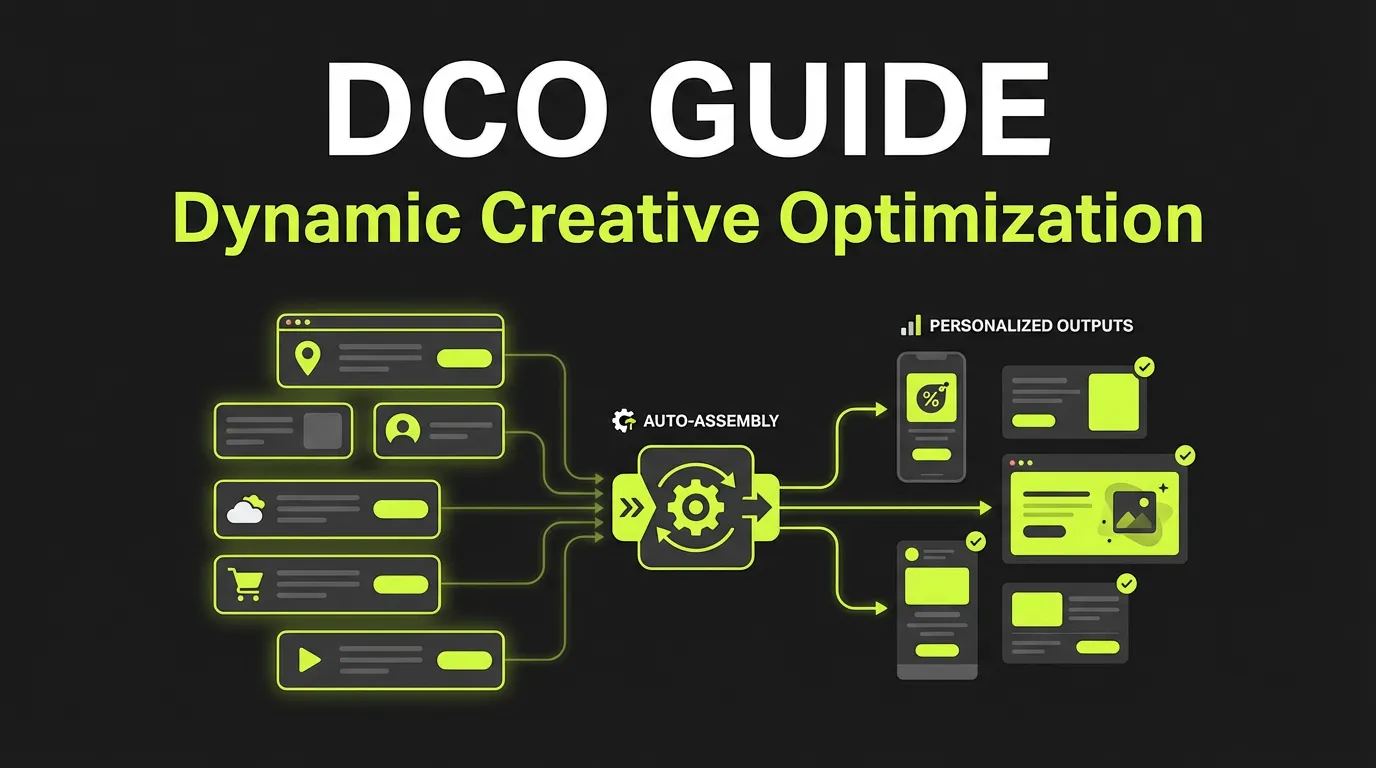
Dynamic Creative Optimization (DCO) automatically assembles and serves personalized ads based on user data, context, and performance signals. Instead of creating hundreds of ad variants manually, DCO combines creative elements in real-time.
For teams that need more campaign-ready variations, AdBid's AI creative factory helps turn briefs into hooks, copy, and ad assets faster.
:::highlight How It Works DCO combines: Headlines + Images + CTAs + Offers → Unique ad for each user based on their data and behavior. :::
Static Ads vs DCO
| Aspect | Static Ads | DCO Ads |
|---|---|---|
| Personalization | One size fits all | Tailored per user |
| Creative volume | 10-50 variants | 1000s of combinations |
| Testing speed | Weeks | Hours |
| Resource needs | High manual effort | Upfront setup, then automated |
| Performance | Baseline | 20-100% improvement |
DCO Platforms
Native Platform Options
Meta Advantage+ Creative
- Built into Ads Manager
- Combines creative elements automatically
- No additional cost
- Limited customization
Google Responsive Display Ads
- Up to 15 images, 5 headlines
- Automatic optimization
- Free to use
- Works across Display Network
Dedicated DCO Platforms
| Platform | Best For | Starting Price |
|---|---|---|
| Flashtalking | Enterprise | $5K+/month |
| Celtra | High-volume retail | $3K+/month |
| Smartly.io | Social-focused | $10K+/month |
| Clinch | Omnichannel | $5K+/month |
| Bannerflow | Display focus | $500+/month |
Setting Up DCO
Step 1: Audit Your Data
Required data:
- Product catalog (ID, name, image, price)
- User behavior tracking
- Audience segmentation
- Conversion tracking
Step 2: Prepare Creative Assets
Minimum needed:
- 5 headlines (varying length)
- 5-10 product images
- 3-5 lifestyle images
- 3 CTA variants
- Multiple offers/promotions
Asset guidelines:
- Consistent quality
- Various aspect ratios
- Clear product shots
- Brand-compliant
Step 3: Define Personalization Rules
Example rules:
IF user viewed product in last 7 days
THEN show that product + discount offer

IF cart value > $100
THEN show free shipping CTA

IF returning customer
THEN show loyalty message

IF new visitor
THEN show bestsellers
Step 4: Set Up Feed Connection
For e-commerce DCO:
- Connect product feed (Google Merchant, Facebook Catalog)
- Ensure real-time inventory updates
- Include all product attributes
- Set up price/availability signals
Step 5: Launch & Optimize
- Start with broad rules
- Let ML learn (2-4 weeks)
- Review performance by element
- Refine rules based on data
DCO Creative Best Practices
Headlines
- Test benefit-focused vs feature-focused
- Include personalization tokens
- Vary length (short for mobile)
- Use urgency appropriately
Examples:
- Generic: "Shop Our Sale"
- Personalized: "Your [Product] is 30% off"
- Urgency: "Only 2 left in stock"
Images
- Product on white background (clear)
- Product in context (lifestyle)
- User-generated content (authentic)
- Various angles and zoom levels
CTAs
| CTA Type | When to Use |
|---|---|
| Shop Now | E-commerce, ready buyers |
| Learn More | Consideration phase |
| Get Started | SaaS, free trials |
| Claim Offer | Promotions |
| See Details | Complex products |
Offers
- Percentage off (works best generally)
- Dollar amount off (for high-value)
- Free shipping (high influence)
- Bundle deals (increase AOV)
- Limited time (creates urgency)
Measuring DCO Performance
Key Metrics
Creative metrics:
- CTR by element combination
- Engagement by image type
- CTA performance
- Headline effectiveness
Business metrics:
- ROAS improvement vs static
- Cost per conversion
- Conversion rate lift
- Revenue per impression
Testing Framework
- Baseline: Run static control
- Test: Launch DCO variant
- Measure: Compare performance
- Iterate: Optimize elements
- Scale: Expand winning combinations
Common DCO Mistakes
1. Too Many Variables
Problem: Testing everything at once Solution: Start with 3-4 elements, expand gradually
2. Poor Quality Assets
Problem: Inconsistent or low-quality creative Solution: Invest in asset production first
3. No Clear Strategy
Problem: DCO without personalization logic Solution: Define rules before technical setup
4. Ignoring Brand Guidelines
Problem: Combinations that look off-brand Solution: Set creative constraints and exclusions
5. Not Enough Data
Problem: Optimization without sufficient volume Solution: Need 1000+ impressions per variant minimum
DCO for Different Channels
Meta (Facebook/Instagram)
- Use Advantage+ creative
- Dynamic Product Ads for retargeting
- Catalog-connected creative
- Up to 10 creative variations
Google Display Network
- Responsive Display Ads
- Dynamic remarketing
- Feed-connected creative
- Automated asset optimization
Programmatic Display
- Use dedicated DCO platform
- Connect via ad server
- Real-time bidding integration
- Cross-publisher reach
Video
- Dynamic video templates
- Scene-based assembly
- Audio personalization
- Most complex to implement
Advanced DCO Strategies
1. Sequential Messaging
Show different creative based on funnel stage:
- Awareness: Brand story
- Consideration: Product benefits
- Decision: Offer/social proof
- Loyalty: Cross-sell/upsell
2. Weather-Triggered Creative
- Show rain gear when weather is bad
- Promote ice cream on hot days
- Adjust messaging by temperature
3. Inventory-Based Optimization
- Promote low stock items
- Hide out-of-stock products
- Push slow-moving inventory
4. Price Sensitivity Targeting
- Show deals to price-sensitive segments
- Feature quality/premium to others
- Test discount levels
The Future of DCO
Emerging Trends
- AI-generated creative: Auto-create variants
- Real-time video: Personalized video ads
- Cross-channel coordination: Unified personalization
- Privacy-first DCO: First-party data focus
Frequently Asked Questions
Is DCO worth it for small advertisers in 2026?
DCO can help small advertisers, but the prerequisites matter more than size. You need a reliable product feed or first-party data and enough traffic for the system to learn. Retargeting and catalog use cases tend to deliver value fastest, since they rely on owned data rather than open-web tracking.
Does generative AI replace designers in DCO?
No. Generative tools speed up variant production, but they need direction, brand guardrails, and human review. Designers shift from building every asset to defining systems, prompts, and quality standards. The strongest 2026 programs pair generation with disciplined creative oversight rather than removing the human layer.
How is the 2026 approach different from earlier DCO?
Earlier DCO assembled pre-built modules using rules. The 2026 approach adds generative production and leans on contextual and first-party signals because of privacy changes. The core mechanics of feeds, segments, and testing still apply, so the 2025 guide remains a useful foundation.
What data do I need to start with DCO?
At minimum, a clean product feed with accurate images, pricing, and availability, plus defined audience segments. First-party signals such as cart status and purchase recency strengthen personalization. Poor feed quality is the most common cause of weak DCO results, so audit your data before scaling spend.
Conclusion
DCO in 2026 is less about swapping pre-made parts and more about generating relevant creative against privacy-durable signals. The technology removed the old supply bottleneck, which means the new competitive edge is judgment: clean data, tight brand guardrails, disciplined testing, and steady refresh cycles.
Start where confidence is highest, usually retargeting and catalog ads, prove incremental lift against a static baseline, then expand. Keep generation on a leash with clear guardrails, and treat creative refresh as a recurring habit rather than a rescue mission.
Ready to produce and manage DCO-ready creative at scale? Explore the AdBid Creative Factory to turn briefs into campaign-ready variants faster.