
Part of our Snapchat Ads Platform guide series.
Snapchat Ads: Complete Guide to Advertising on Snapchat
Snapchat Ads is the advertising platform of Snapchat, the camera-first messaging app that reported 971 million monthly active users and 493 million daily active users in the second quarter of 2026 (Snap Inc.). Advertisers run full-screen vertical video Snap Ads, Story Ads, Collection Ads, and augmented-reality Lenses and Filters through Snapchat Ads Manager, a self-serve tool with a $5 daily minimum (Snap for Business). The platform's appeal is audience composition: Snap says it reaches 75% of 13-34 year olds in the US and about 90% of 13-24 year olds in more than 25 countries, a group that is hard to find at scale on Facebook or LinkedIn. Users also create about 5.5 billion Snaps a day (Snap Newsroom), which makes AR and camera-native creative a natural fit. This guide covers account setup, ad formats, targeting, the Snap Pixel, creative rules, budgets, and the benchmarks to judge campaigns against.
To run this repeatably, AdBid's automated rules let you set conditions once and let campaigns self-optimize.
Why Advertise on Snapchat?
Unique Audience
- Reaches 90% of 13-24 year-olds in 25+ countries (Snapchat for Business)
- 75% of 13-34 year olds in the US use Snapchat (Snap for Business, via Sprout Social)
- 971 million monthly and 493 million daily active users (Snap Inc., Q2 2026)
- 5.5 billion Snaps created every day (Snap Newsroom)
Platform Advantages
| Advantage | Detail |
|---|---|
| Attention | Full-screen, sound-on format |
| Engagement | AR experiences drive interaction |
| Intent | "Ready to shop" mindset |
| Competition | Less saturated than Meta |
| Innovation | Cutting-edge AR capabilities |
Audience Demographics
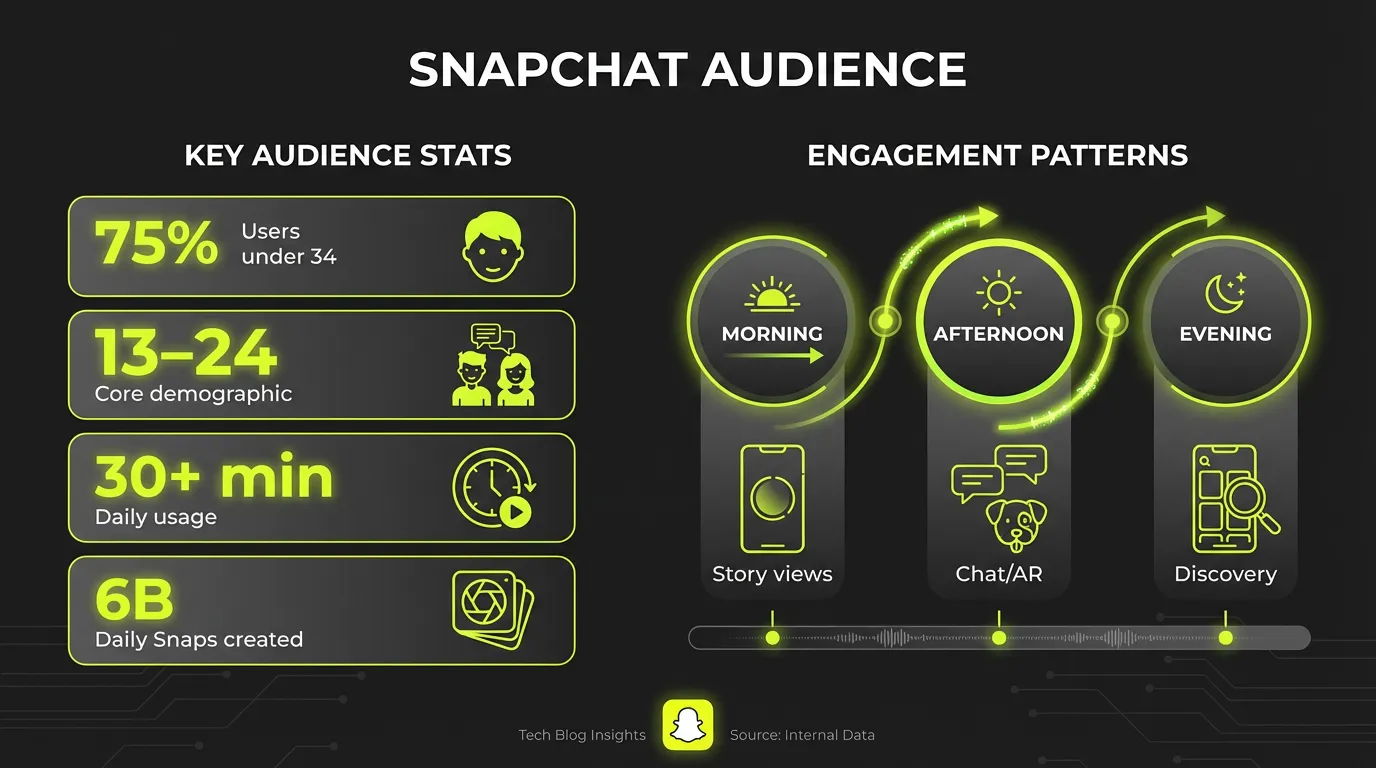
| Age group | Share of ad audience (DataReportal) |
|---|---|
| 13-17 | 18% |
| 18-24 | 37% |
| 25-34 | 25% |
| 35+ | 19% |
Snapchat Ads Manager
Campaign Objectives
Awareness:
- Brand awareness
- Reach
Consideration:
- App installs
- App engagement
- Website visits
- Video views
- Lead generation
Conversion:
- Website conversions
- Catalog sales
Campaign Structure
Campaign Level:
- Objective
- Status
- Budget settings
Ad Set Level:
- Targeting
- Budget and schedule
- Bid strategy
- Placement
Ad Level:
- Creative assets
- Call-to-action
- Destination
Snapchat Ad Formats
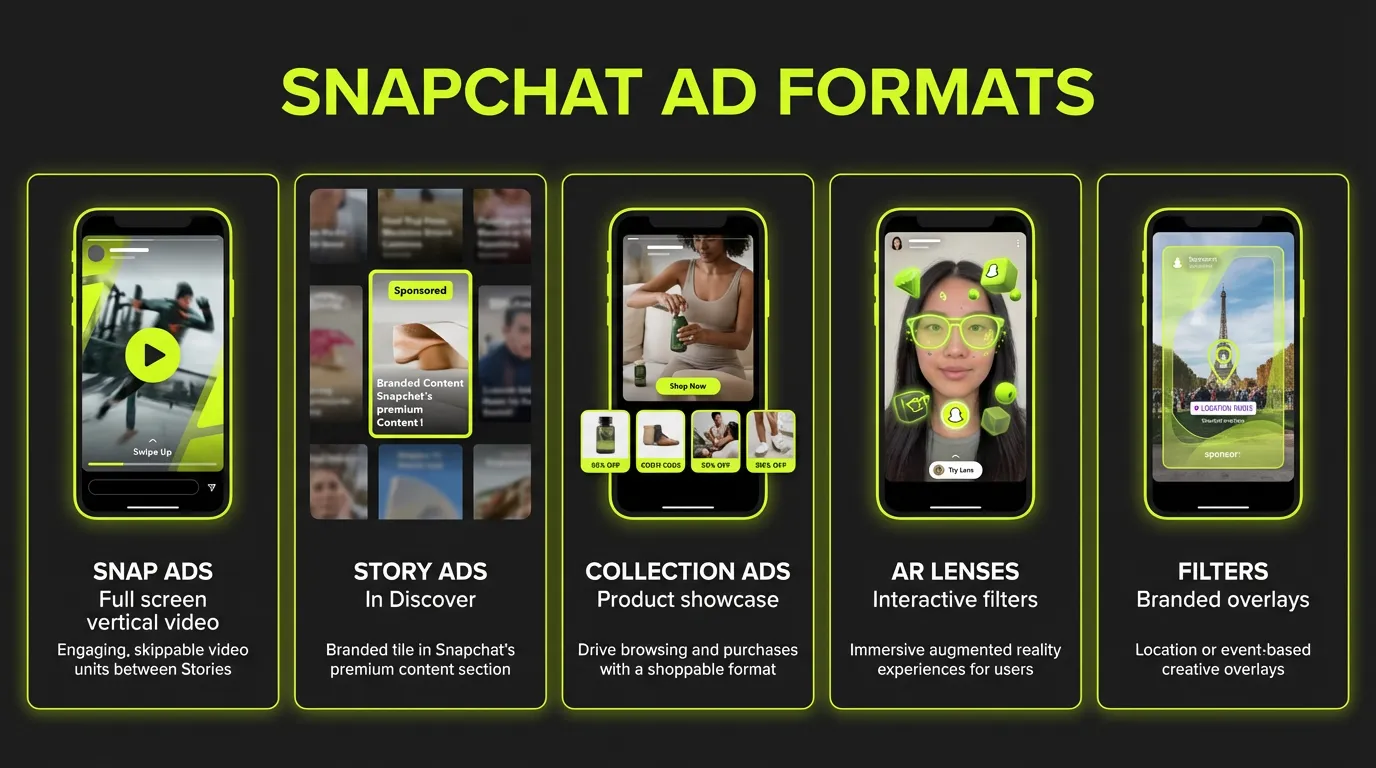
1. Single Image or Video Ads
Specifications:
- Aspect ratio: 9:16
- Resolution: 1080x1920
- Video length: 3-180 seconds (3-10 recommended)
- File size: Max 1GB for video
- File type: MP4, MOV (video); JPG, PNG (image)
Best Practices:
- Capture attention in first 2 seconds
- Design for sound-on
- Include clear CTA
- Vertical only
2. Collection Ads
Features:
- Hero image/video with product tiles
- Up to 4 tappable tiles
- Showcase multiple products
- Drive to product pages
Best For:
- E-commerce brands
- Multi-product promotion
- Catalog campaigns
3. Story Ads
Features:
- Appear in Discover section
- Multiple snaps in sequence
- Brand-owned tile
- 3-20 snaps per story
Best For:
- Brand storytelling
- Product launches
- Tutorial content
4. Commercial Ads
Features:
- Non-skippable (6 seconds)
- Extended reach (up to 180s)
- Premium placement
- Higher completion rates
Best For:
- Brand awareness
- Video view campaigns
- Message delivery
5. AR Lenses
Types:
- Face Lenses (transform faces)
- World Lenses (augment environment)
- Sponsored Lenses (branded experiences)
Benefits:
- High engagement (30+ second interactions)
- Shareability
- Brand recall
- Innovative positioning
Costs:
- Self-serve: from $5/day (Snap for Business); Snap recommends $20-50/day to leave the exploration phase
- Premium: Custom pricing
6. Filters
Features:
- Location or time-triggered
- Overlays for Snaps
- On-demand for events
- Community geofilters
Best For:
- Local businesses
- Events
- Location-based marketing
7. Dynamic Ads
Features:
- Auto-generated from catalog
- Personalized to users
- Retargeting capable
- Multiple formats
Targeting Options
Demographics
- Age: 13-50+
- Gender: Male, Female, All
- Language: 40+ languages
- Location: Country, state, city, radius
Interests
Categories include:
- Lifestyle interests
- Visitors (places)
- Viewer categories (content)
- Shopping interests
Snap Lifestyle Categories
Unique behavioral segments:
- Gamers
- Sports enthusiasts
- Beauty mavens
- Foodies
- Travel buffs
- Music fans
- And more...
Custom Audiences
Sources:
- Customer lists
- Website traffic (Snap Pixel)
- App activity
- Engagement
- Ad engagement
Lookalike Audiences
Create from:
- Customer lists
- Pixel audiences
- App audiences
- Existing custom audiences
Predefined Audiences
Snap's first-party data segments:
- Auto intenders
- New parents
- Tech enthusiasts
- Premium shoppers
Snap Pixel Setup
Installation
Methods:
- Manual code installation
- Partner integration (Shopify, etc.)
- Google Tag Manager
- Conversions API
Events to Track
Standard Events:
- Page View
- View Content
- Add to Cart
- Start Checkout
- Purchase
- Sign Up
- Search
Advanced Matching
Improve attribution with:
- Phone number
- IP address
- User ID
Creative Best Practices
The First 2 Seconds
Critical for stopping thumbs:
- Start with action
- Use bold visuals
- Include branding early
- Hook immediately
Sound Strategy
64% of Snapchat ads are viewed with sound on (Snap for Business), so plan for both cases:
- Use voiceover
- Add music
- Include sound effects
- Create audio hooks
Mobile-First Design
- Fill the screen (9:16)
- Large, readable text
- Simple messaging
- Clear focal point
CTA Placement
- Show CTA multiple times
- Use Snapchat's CTA options
- Reinforce in creative
- Make action obvious
Creative Formats That Work
UGC Style:
- Authentic feel
- Testimonial format
- Relatable creators
Product Demo:
- Quick how-to
- Feature showcase
- Before/after
Trend Integration:
- Platform trends
- Meme formats
- Cultural moments
Campaign Optimization
Bidding Strategies
Auto-Bid:
- Snapchat optimizes
- Good for starting
- Less control
Target Cost:
- Set desired CPA
- Predictable costs
- May limit scale
Max Bid:
- Set ceiling
- Maximum control
- May limit delivery
Budget Recommendations
| Goal | Platform minimum (Snap) | Our recommended start |
|---|---|---|
| Awareness | $5 | $20-50 |
| Traffic | $5 | $20-50 |
| Conversions | $5 | $50-100 |
| App Install | $5 | $50-100 |
Learning Phase
Timeline:
- Typically 1-2 weeks
- Needs 50+ conversions
- Avoid major changes
Tips:
- Set adequate budget
- Use broad targeting initially
- Be patient with performance
Key Metrics
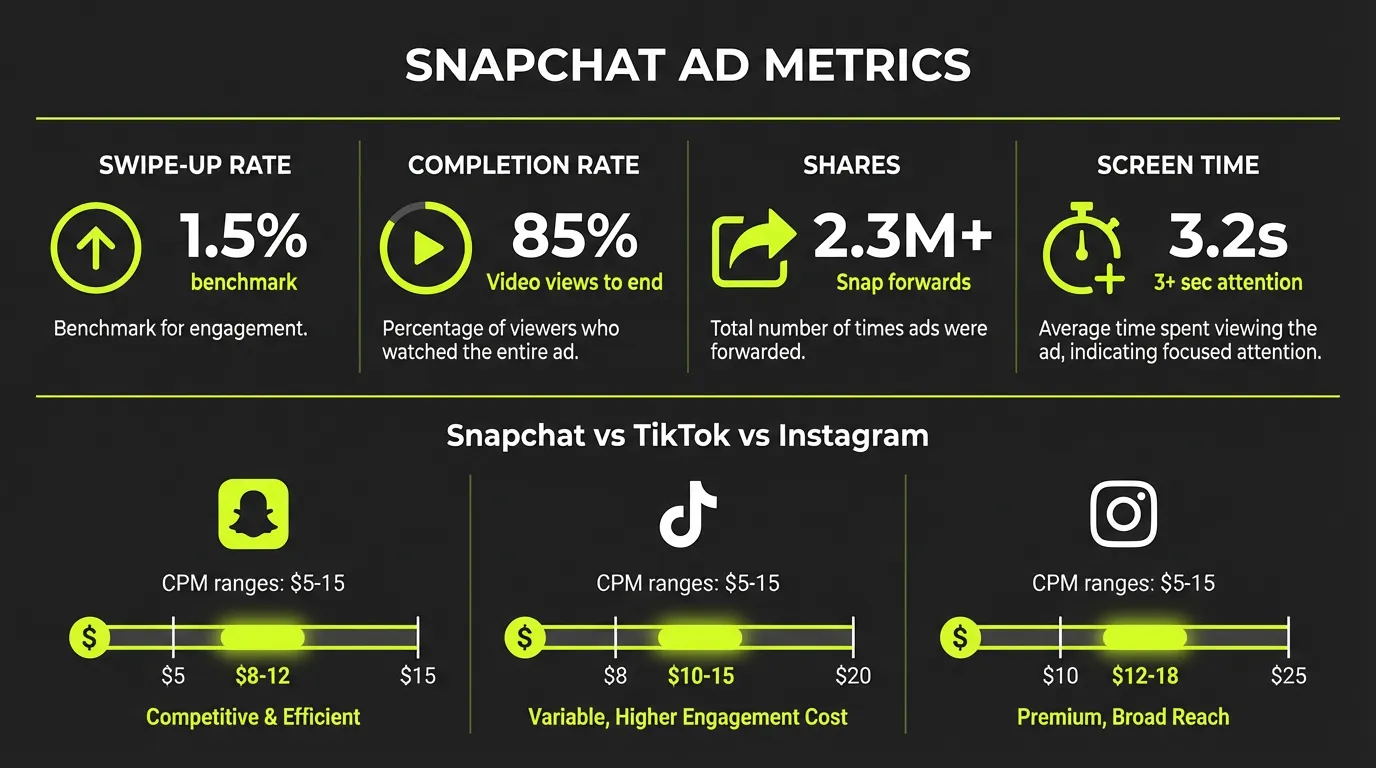
| Metric (targets from our account reviews) | Good | Great |
|---|---|---|
| Swipe Up Rate | 0.4% | 0.8%+ |
| 2-Sec Video View | 40% | 60%+ |
| Video Completion | 15% | 25%+ |
| eCPM | <$10 | <$6 |
Optimization Actions
Low Swipe Rates:
- Test new creative
- Improve CTA
- Refine targeting
- Try different formats
High CPMs:
- Broaden audience
- Improve quality
- Refresh creative
- Test automatic bidding
Low Conversions:
- Check landing page
- Improve pixel setup
- Use retargeting
- Test offers
Advanced Strategies
Retargeting
Sequence Strategy:
- Awareness (video views)
- Consideration (engaged users)
- Conversion (website visitors)
- Retention (purchasers)
App Install Campaigns
App Events Optimization:
- Optimize for in-app actions
- Not just installs
- Better quality users
Deep Linking:
- Send to specific content
- Improve user experience
- Better conversion rates
AR Campaigns
Planning:
- Define interaction goal
- Keep mechanics simple
- Include share prompts
- Brand appropriately
Measurement:
- Lens plays
- Play time
- Shares
- Saves
Dynamic Product Ads
Catalog Setup:
- Create product catalog
- Upload feed
- Set up product sets
- Enable dynamic ads
Retargeting:
- View content
- Add to cart
- Abandoned cart
- Past purchasers
Snapchat vs Other Platforms
| Factor | Snapchat | TikTok | |
|---|---|---|---|
| Gen Z reach | Highest | High | Medium |
| AR capabilities | Best | Growing | Good |
| CPMs | Lower | Low | Higher |
| Competition | Lower | Growing | High |
| Full-screen native | Yes | Yes | Partial |
Common Mistakes
1. Repurposing Content
Snapchat needs native creative. Don't use horizontal videos.
2. Slow Hooks
2-second attention window. Get to the point immediately.
3. Ignoring Sound
Sound-on platform. Design for audio from the start.
4. Over-Targeting
Start broad. Snapchat's algorithm is effective with data.
5. Wrong Audience Assumptions
Don't assume "young people only." 25-34 is growing.
Snapchat Shopping
Catalog Setup
Step 1: Create product catalog in Ads Manager
Step 2: Upload product feed (CSV or XML)
Step 3: Verify and approve products
Step 4: Connect to ad campaigns
Shopping Features
Public Profiles: Shoppable brand profiles Product Tags: Tag products in organic content Native Checkout: In-app purchasing
Measurement & Analytics
Snapchat Analytics
Available Reports:
- Campaign performance
- Audience insights
- Creative analysis
- Attribution
Key Metrics
Awareness:
- Impressions
- Reach
- Frequency
- Video views
Engagement:
- Swipe-ups
- Shares
- Screenshots
- Lens plays
Conversion:
- Conversions
- CPA
- ROAS
- Attribution
Attribution Windows
Default Windows:
- Click: 28 days
- View: 1 day
Custom Options:
- 1, 7, or 28 day click
- 1 or 7 day view
Measuring Snapchat Ad Performance
Key Metrics
| Metric | Description | Benchmark |
|---|---|---|
| Impressions | Ad views | Volume |
| Swipe-Up Rate | CTR equivalent | 0.35-0.5% |
| Video Views | View metrics | — |
| Play Time | Engagement depth | 5+ seconds |
| Conversions | Goal completions | Varies |
| ROAS | Return on ad spend | 2x+ target |
Snap Pixel
Install on your website to track:
- Page views
- Add to cart
- Purchases
- Sign-ups
- Custom events
Attribution Settings
- 28-day click, 1-day view (default)
- Adjustable windows
- Cross-device tracking
- Offline conversions
Smart Bidding: AI-Powered Optimization
The biggest update is Smart Bidding. You set a target cost-per-action, and Snapchat's AI automatically adjusts bids throughout the day.
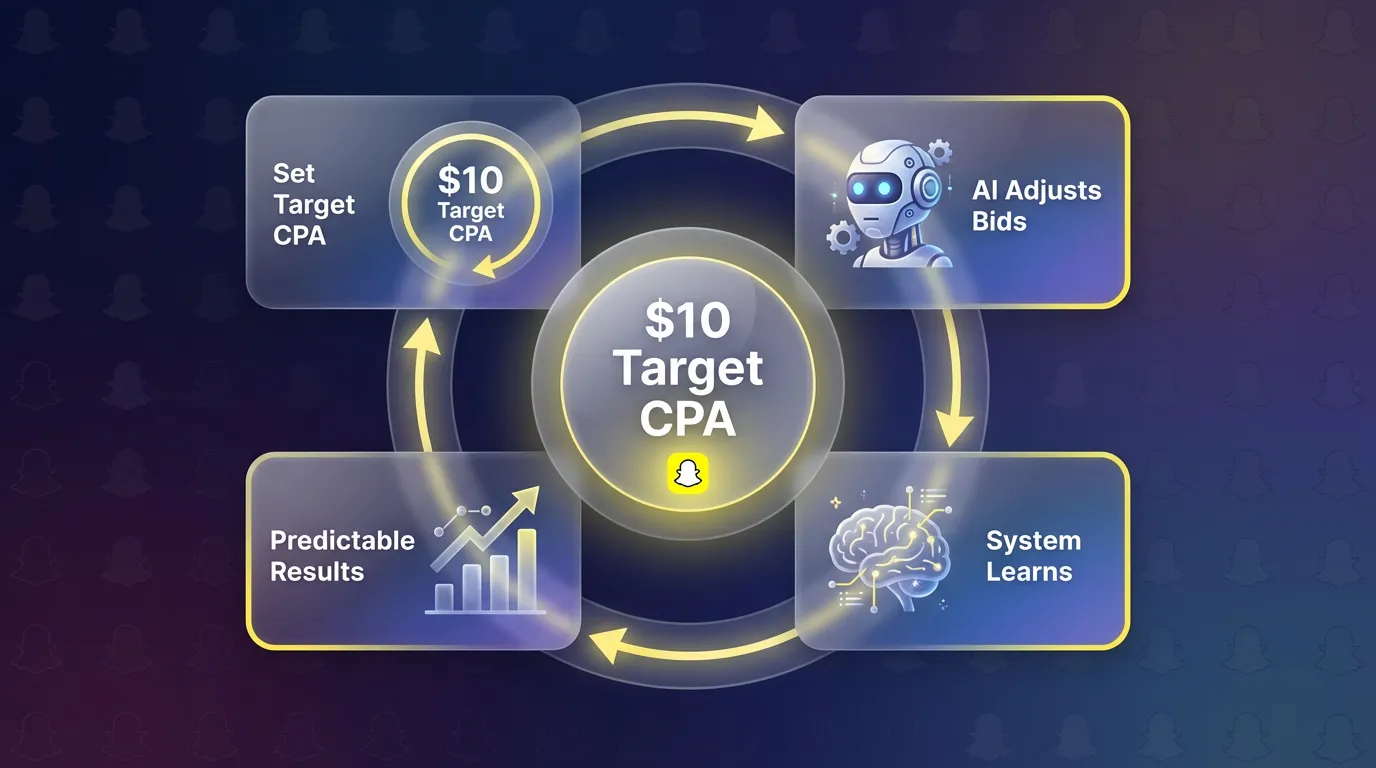
:::info How Smart Bidding Works
- You set a target CPA (e.g., $10 per install)
- Snapchat's algorithm adjusts bids in real-time
- System learns from conversions to improve targeting
- Results: More predictable outcomes, less manual optimization :::
Smart Bidding vs. Manual Bidding
| Approach | Best For | Trade-off |
|---|---|---|
| Smart Bidding | Predictable CPA, hands-off | Less control over delivery |
| Manual Bidding | Maximum control, testing | Requires active management |
My recommendation: Start with Smart Bidding to establish baselines, then test manual bidding for specific optimizations.
Smart Budget: Automatic Reallocation
Paired with Smart Bidding, Smart Budget automatically moves spend toward your best-performing ads.
"Smart Budget reallocates spending toward top-performing advertisements automatically" — Snapchat's promise
:::tip When to Use Smart Budget
- Running multiple ad variations simultaneously
- Testing different creative approaches
- Want algorithm-driven optimization
- Have sufficient daily budget for learning :::
:::warning When to Avoid Smart Budget
- Testing specific hypotheses (need controlled spend)
- Limited budget (may concentrate on one winner too quickly)
- Early campaign stages before sufficient data :::
Sponsored Snaps: Chat Feed Placement
This is the placement that changed my view on Snapchat. Sponsored Snaps appear directly in the Chat Feed — where users spend most of their time.
Format Options
First Snap Takeover: Your ad is the first thing users see when opening Chat Feed. Premium pricing, massive reach.
Auction Sponsored Snaps: Compete via bidding for Chat Feed placement. More accessible pricing.
Real Results
Calvin Harris campaign example:
- Reached 11.8 million users (Snapchat for Business)
- Drove 58% boost in Spotify streams (Snapchat for Business)
- Demonstrated entertainment/music vertical potential
:::highlight Sponsored Snaps Insight Chat Feed placement feels less intrusive than feed ads. Users are in a messaging mindset — they're used to receiving content from friends. Ads that match this context perform well. :::
App Power Pack: Bundle for App Marketers
If you're marketing an app, the App Power Pack bundles four powerful features:
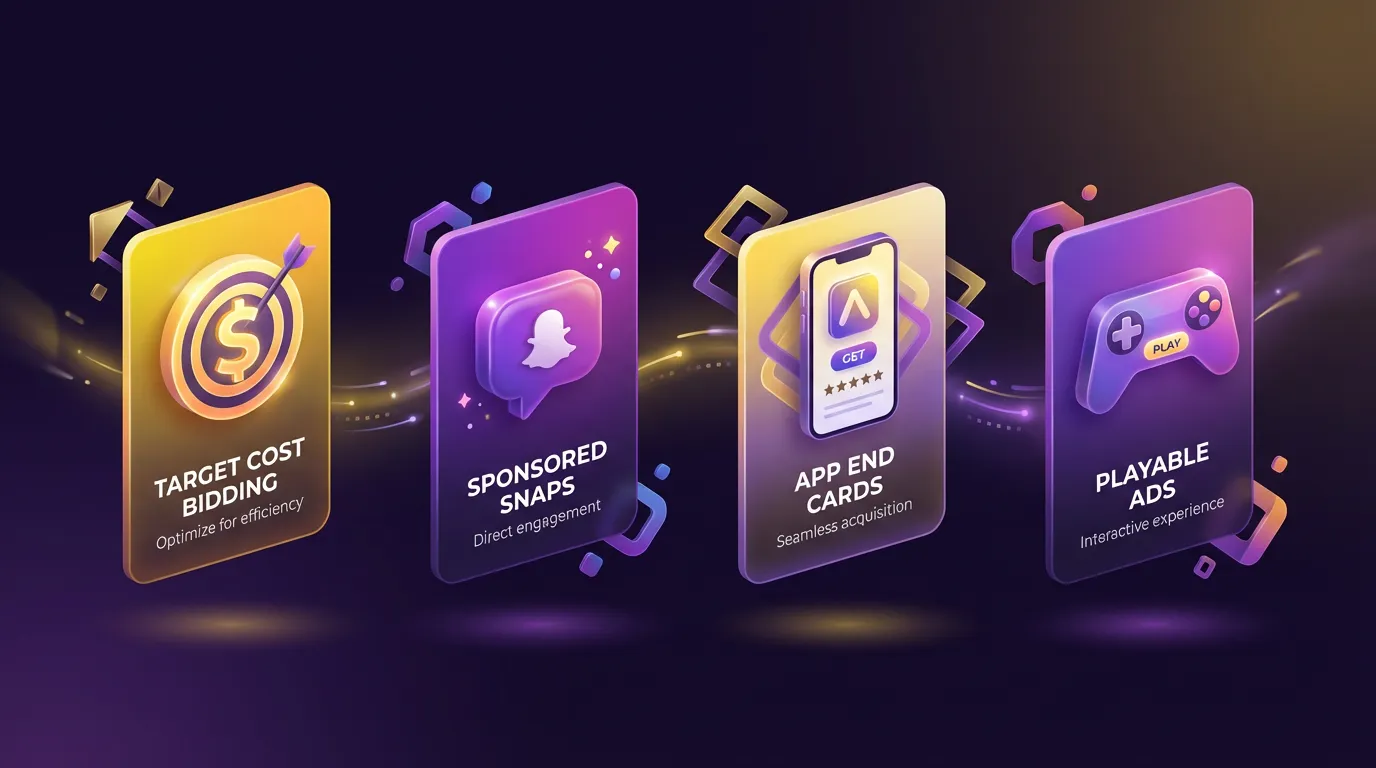
1. Target Cost Bidding
Set your target cost per install. Algorithm optimizes delivery.
2. Sponsored Snaps Placement
Chat Feed visibility for app install campaigns.
3. App End Cards
Show App Store preview cards at the end of video ads. Users see ratings, screenshots, and can install directly.
4. Playable Ads
Let users try a lightweight version of your app before installing. Particularly effective for games.
:::info Early Results Advertisers using App Power Pack reported up to 25% increase in app installations (Marketing Dive) compared to standard campaigns. :::
API Eligibility Endpoint: Pre-Launch Validation
This technical update matters more than it sounds. Before launching, the API now validates:
- Optimization goal compatibility
- Conversion data quality
- Campaign configuration
Why it matters: Catches misconfigured campaigns before you waste budget. No more discovering tracking issues after spending thousands.
Audience & Targeting
Snapchat's audience skews younger, but the platform has expanded:
Core Demographics
- 18-34 primary (but growing 35+ segment)
- High engagement among Gen Z and young millennials
- Strong in entertainment, gaming, fashion, food
Targeting Options
- Demographic (age, gender, location)
- Interests (based on content engagement)
- Custom audiences (website visitors, customer lists)
- Lookalikes (based on custom audiences)
- Snap Audience Match (email/phone matching)
:::tip Targeting Strategy Start broad with Smart Bidding, let the algorithm find your audience. Then analyze converters and build lookalikes for scaling. :::
Measurement & Attribution
Snapchat's Attribution
Default windows:
- 28-day click-through
- 1-day view-through
Cross-Platform Validation
:::warning Don't Trust Platform Data Alone As with any platform, validate Snapchat's reported conversions against your own tracking. Use UTM parameters and compare with Google Analytics or your MMP. :::
Getting Started: Recommended Approach
For App Marketers
- Enable App Power Pack
- Start with Target Cost bidding at your break-even CPA
- Test 3-5 creative variations
- Use Playable Ads if applicable to your app type
- Scale winners, refresh creative monthly
For E-commerce/Web
- Install Snap Pixel on all pages
- Start with web conversion objective
- Use Sponsored Snaps for broad reach
- Test Collection Ads for product showcases
- Build customer list audiences for remarketing
Conclusion
Snapchat offers unique opportunities to reach younger, engaged audiences through innovative ad formats. Success requires understanding the platform's culture and creating content that feels native.
Start with clear objectives, create Snap-native content, and iterate based on performance data.
Ready to launch Snapchat campaigns? Try AdBid's multi-platform management →